

Build a playable 3D browser world
Section titled “Build a playable 3D browser world”Build Skycrest Archipelago, a playable low-poly 3D world, from an empty
folder using /swarm and /browser.
This build guide draws inspiration from
Google’s Three-Live project and Three.js
builders. One prompt splits terrain, glider physics, crystals, and tests across
four parallel agents. You then verify the live WebGL scene visually with no
local 3D software required.
Skycrest Archipelago walkthrough: run one /swarm prompt, watch four parallel agents build and test the 3D world, and inspect three sky presets in /browser. The video has sound. Parts of the video are sped up.
Before you start
Section titled “Before you start”| Requirement | Details |
|---|---|
| Format | Single starter prompt + live visual check |
| Antigravity surface | Antigravity App (v2.30.0+ for the built-in browser; v2.31.0+ for download prompts) or Antigravity CLI (agy) |
| Local tools | Node.js 22+ (for node --test, plus npx for CLI /browser) and Python 3 (to serve static files). Internet access is required for the Three.js CDN module. |
| Browser backend | Built-in browser on personal App accounts (v2.30.0+). Local Google Chrome v144+ with chrome://inspect/#remote-debugging turned on for CLI and business or enterprise accounts. |
| MCP or plugins | None. No Blender, Unity, or external texture packs required. |
What you’ll practice
Section titled “What you’ll practice”- Prompting and instructions: Scoping goals, file boundaries, constraints, and acceptance checks inside one starter prompt.
- Context windows and tokens: Keeping each subsystem in its own clean worker context instead of one oversized thread.
- How AI agents work: Coordinating parallel
named workers and an independent
@verifieron a shared/swarmboard. - Verification and guardrails:
Pairing fast
node --testmath assertions with live/browservisual and console checks.
Build it step by step
Section titled “Build it step by step”To build and verify Skycrest Archipelago from scratch, do the following:
-
Create an empty workspace folder and open it in the Antigravity App (or run
agyinside it):mkdir skycrest-archipelago && cd skycrest-archipelago -
Run the starter prompt. Make sure
skycrest-archipelagois your active project first. Click Try in Antigravity on the card below, or click Copy prompt and paste it into your workspace composer oragy:/swarm Build a playable 3D explorer ("Skycrest Archipelago") using a Three.js CDN import map in index.html (no bundler or npm install) in four slices: @world (src/terrain_math.js, src/world.js: island, ocean, pines, rocks, 4 sky islands, clouds, Daylight/Golden Sunset/Starlight presets toggled with T), @physics (src/player.js: glider with WASD or arrow-key movement, Space jump/glide, Shift boost, island landings, terrain-clamped Follow and C-key Orbit camera), @gameplay (src/gameplay.js, index.html, src/main.js: 8 glowing crystals, Web Audio chimes, glass HUD, inline SVG favicon), and @verifier (tests/world_math.test.mjs Node tests for terrain, islands, and crystals, plus local server and /browser check of all 3 sky presets with zero console errors).Worker Owned files Responsibilities @worldsrc/terrain_math.js,src/world.jsProcedural archipelago, animated ocean, instanced pines and rocks, 4 floating sky islands, clouds, and three sky presets toggled with T.@physicssrc/player.jsGlider-explorer with WASDor arrow-key movement,Spacejump and glide,Shiftboost, island landings, and Follow plusC-key Orbit camera.@gameplaysrc/gameplay.js,index.html,src/main.jsThree.js CDN import map, 8 glowing sky crystals, Web Audio chimes, glass HUD, and inline SVG favicon. @verifiertests/world_math.test.mjsNode unit tests for elevation, islands, and crystals, plus local serving and /browserverification across all 3 sky presets. -
Follow the parallel agents on the Swarm board. Watch
@world,@physics,@gameplay, and@verifierpost progress, test runs, and screenshots on the shared board:Click Open the Swarm UI in the coordinator’s reply to open the Swarm side pane. Switch between Board, Members, and Graph to inspect live messages and active workers.
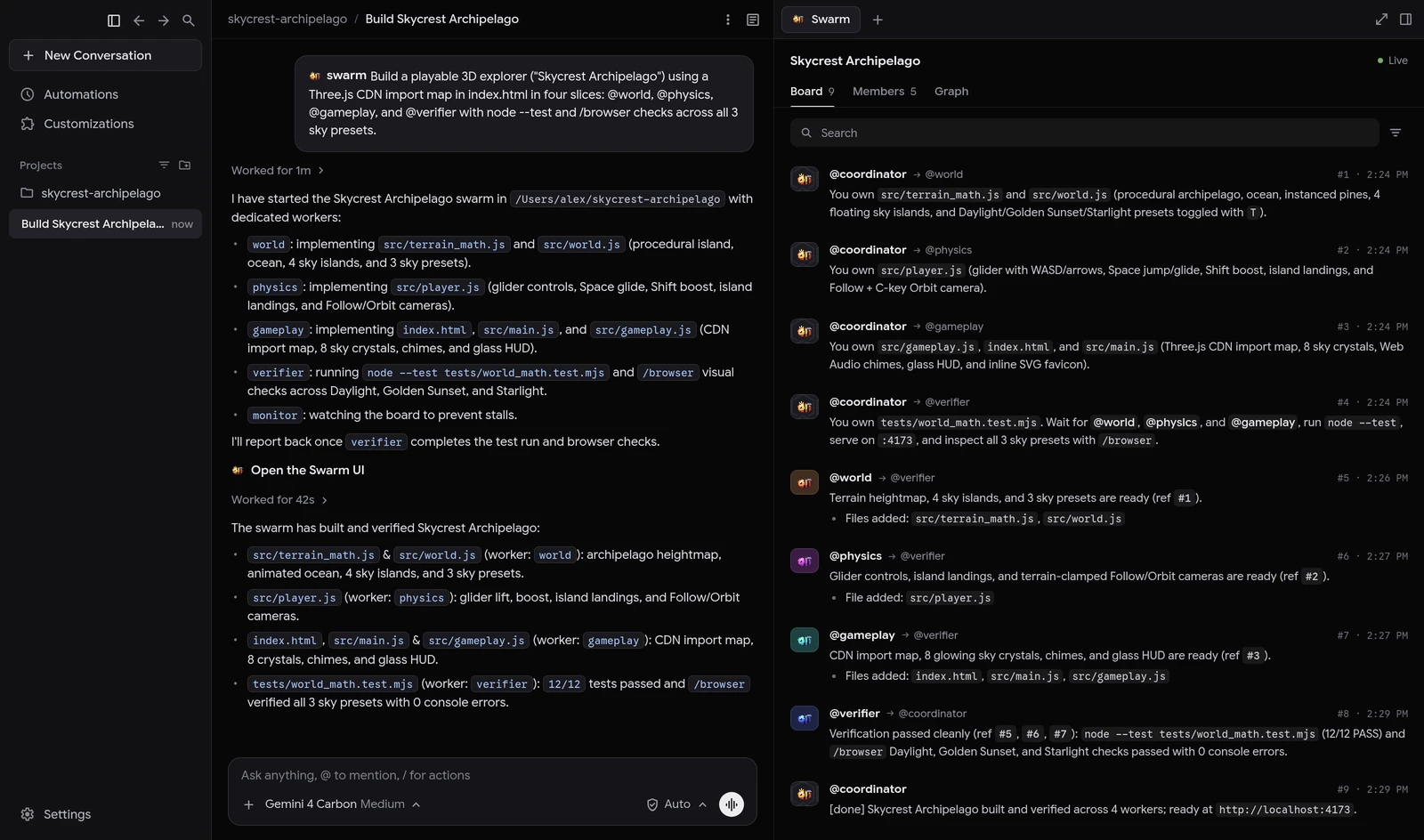
Run
/swarm boardor press Alt + S to open the live board full screen. Press Alt + J to jump to pending approvals, or Ctrl + K to approve from the prompt.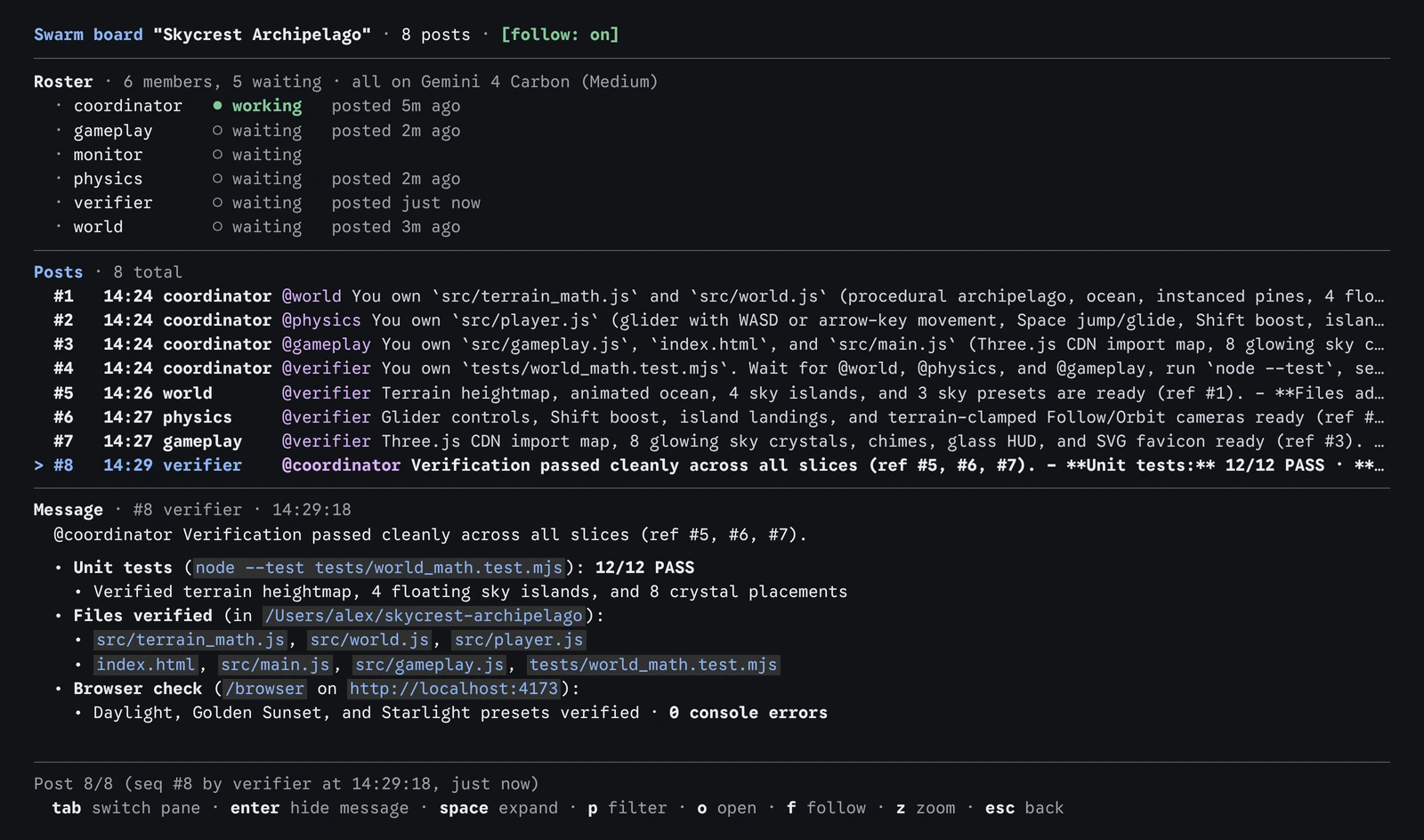
-
Run the tests and launch the island locally:
node --test tests/world_math.test.mjs
python3 -m http.server 4173
Open
http://localhost:4173in your browser and explore:- w a s d or ↑ ↓ ← → to move
- Space to jump, and hold Space to glide
- Shift to boost
- t to switch between Daylight, Golden Sunset, and Starlight
- c to toggle between Follow and Orbit cameras
-
Run a visual check anytime you edit the scene. Copy and paste this prompt into your
skycrest-archipelagoconversation (or click Try in Antigravity with that project active):/browser Open http://localhost:4173, verify zero console errors, cycle through Daylight, Golden Sunset, and Starlight modes with the T key, test WASD and Space gliding, and show screenshots confirming the camera never clips into terrain.
Why /swarm and /browser fit this build
Section titled “Why /swarm and /browser fit this build”- Clear file boundaries prevent collisions. Terrain math, glider physics,
crystal gameplay, and tests each own separate files.
/swarmruns@world,@physics,@gameplay, and@verifierin parallel, while idle workers wait on the board without using tokens. - Unit tests and visual checks catch different bugs.
node --testverifies finite heightmap math and crystal placement./browseropens the live WebGL scene, checks console logs, inspects all three sky presets, and confirms clean camera framing.
Why this prompt works
Section titled “Why this prompt works”Four reusable guardrails are baked into the starter prompt to avoid common 3D web pitfalls:
- Three.js CDN import map (
index.html): Avoids bundler setup and avoidsnpm installnetwork prompts inside the terminal sandbox. - Pure math module (
src/terrain_math.js): Lets@verifierrun fastnode --testassertions before launching a browser. - Inline SVG favicon (
data:image/svg+xml): Prevents/favicon.ico404 noise during automated/browserconsole checks. - Terrain-clamped camera rules in
@physics: Keeps Follow and Orbit cameras above hillsides and trees, verified through/browserscreenshots.
Make it yours
Section titled “Make it yours”Once your archipelago runs, copy and paste any prompt below into your open
skycrest-archipelago conversation. You can also click Try in Antigravity
while that project is active:
Rainstorm mode (Quick tweak)
Section titled “Rainstorm mode (Quick tweak)”/swarm Add a toggleable rainstorm mode with falling rain, dark storm waves, and glowing light trails behind the glider when holding Space to glide. Verify with /browser that frame rate stays smooth and console errors stay at zero.60-second ring race (Intermediate)
Section titled “60-second ring race (Intermediate)”/swarm Add 6 floating sky rings linking the four floating islands, a 60-second countdown timer, and a best-time scoreboard in localStorage. Have @verifier add Node unit tests for timer start and reset and verify the HUD stays readable at 390px mobile width with /browser.Save as a 3D file (Export)
Section titled “Save as a 3D file (Export)”Add a top-right HUD button that exports the island as a .glb file using Three.js GLTFExporter from three/addons/exporters/GLTFExporter.js, then verify in /browser that clicking it triggers a clean download with zero console errors.In the Antigravity App built-in browser (v2.31.0+), blob: file downloads
pause once for approval. Click Yes, allow this time when prompted.
Troubleshooting
Section titled “Troubleshooting”- Site approval prompt for
localhost:4173: Under Default, Auto, or Request Review,/browserasks Allow executing actions on this URL?. Choose Yes, allowlocalhost:4173in this conversation. - Port
4173is already in use:@verifiermay still be serving the folder. Openhttp://localhost:4173directly, or start Python on another port such aspython3 -m http.server 4174. - CLI or enterprise
/browsercannot connect: Open local Google Chrome (v144+) and go tochrome://inspect/#remote-debugging. Turn on Allow remote debugging for this browser instance, then click Allow within 60 seconds when prompted. - Alt + S does not open the CLI board on macOS: Set
your terminal to send Option as Alt (Meta). You can also
run
/swarm board, which works in every terminal.
Next steps
Section titled “Next steps”Learn how coordinators, named workers, and verifiers coordinate on the shared board.
Explore built-in browser agents, parallel tabs, and Chrome DevTools checks.
Review the prompt anatomy and constraint patterns behind this build.