

Dynamic Workflows (/run-workflow)
Section titled “Dynamic Workflows (/run-workflow)”With Dynamic Workflows, the agent writes and runs a short Python script that
coordinates many agents for you. Use /run-workflow when a task splits into
many independent pieces (one review per changed file, one audit per package)
or into staged steps (write a failing test, then fix the code), and you want
predictable, scripted control flow instead of a single long conversation.
Dynamic Workflows give you:
- Parallel and sequential phases: The script runs agents concurrently with
parallel()or one after another withpipeline(), grouped into named phases that you can follow live. - A clean main conversation: Each agent that the workflow starts works in its own conversation and returns a structured result that matches a JSON Schema. File reads, searches, and test logs stay out of your main conversation’s context.
- Single-use and multi-turn agents: A workflow can start one-shot agents (for example, one reviewer per file) or keep a single agent across turns, so the same reviewer that found the bugs can later confirm that they’re fixed.
- Reusable scripts: Ask the agent to save a script that works to a file in your project, and run it again later.
How it works
Section titled “How it works”When you run /run-workflow <task>, or ask for a workflow in your own words,
the following happens:
-
The agent reads the built-in
run-workflowskill and writes a Python script for your task. -
Antigravity shows you the script and asks you to approve it, unless your permission preset already allows it (for example, Turbo). To change the plan, deny the request and tell the agent what to adjust.
-
The workflow runs in the background, so you can keep working in the same conversation. The workflow step shows each phase, log line, and agent as the script progresses.
-
When the script finishes, the main agent receives the workflow’s logs and output and summarizes the results for you.
Agents started by a workflow are full agents with their own conversations. They don’t see the script or each other, so the script gives each agent everything it needs in its prompt and asks for a short, well-defined result.
Launch and monitor a workflow
Section titled “Launch and monitor a workflow”Antigravity App
Section titled “Antigravity App”Dynamic Workflows in the Antigravity App: type /run-work, press Tab to insert the run-workflow command, add your task, approve the script, follow the Discover and Review phases, and open an agent's conversation to approve its request. Parts of the video are sped up.
Launch a workflow
Section titled “Launch a workflow”In any conversation, type /run-workflow followed by your task. As you type,
a menu suggests matching commands: enter /run-work and press Tab
to insert the highlighted run-workflow command, and then type your task
after it:
/run-workflow Find every TypeScript file changed on this branch, review each one in parallel for missing error handling, and give me a one-line verdict per file.You can also ask in your own words, such as “Run a workflow that audits each package in parallel.” Before the workflow starts, the agent shows you the generated script in an Allow running this workflow script? prompt. Choose Yes, allow this time to run it, or choose No and tell the agent what to change:
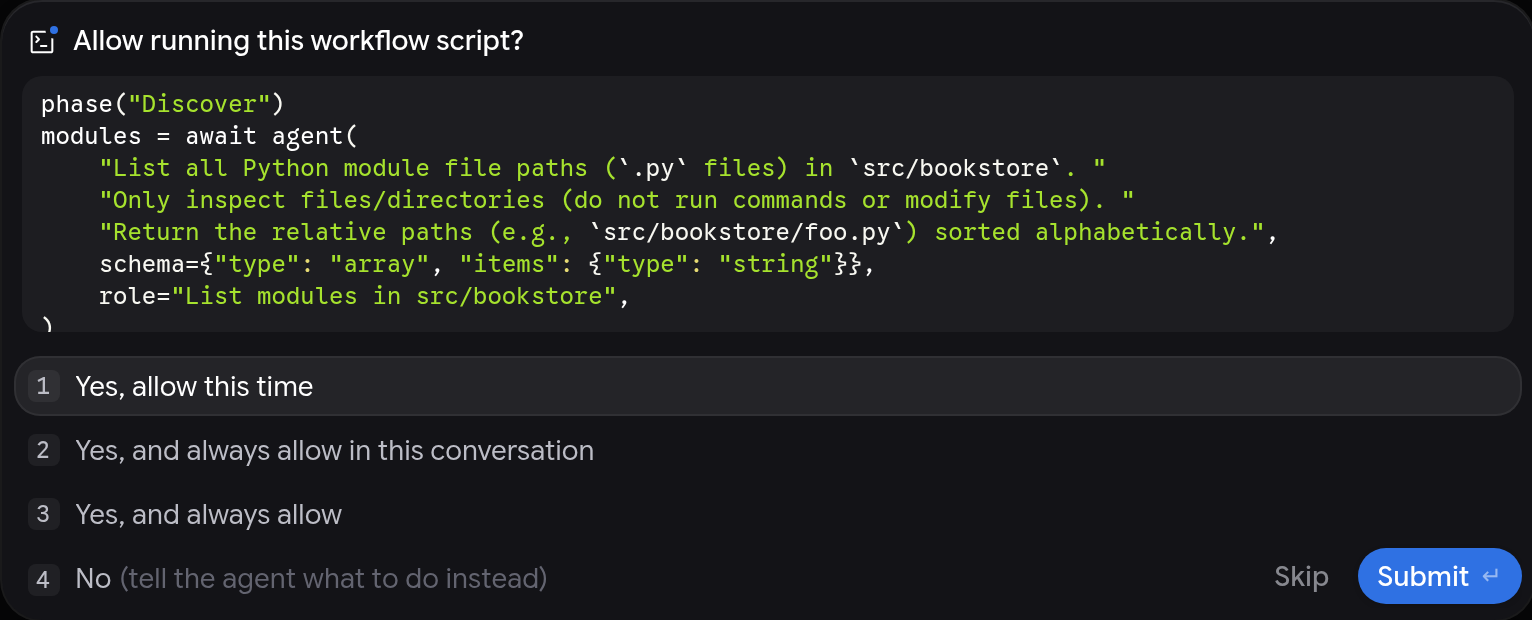
Follow phases and agents
Section titled “Follow phases and agents”The workflow appears as a single step in your conversation, titled with the
workflow’s description, the current phase, and how many of its agents have
finished (for example, workflow · Review · 3/4 agents). Like other tool calls,
the step can be grouped under a collapsed summary such as Worked for 19s;
expand the summary to find it. The workflow keeps running in the background: the
conversation shows 1 task running, and the workflow is listed under
Background Tasks in the side panel’s Overview.
Expand the step to see the following:
- Workflow script: The Python script that’s running, collapsed by default.
- Phases: One section for each named phase in the script.
- Logs: The lines that the script logged during that phase.
- Agent cards: One card for each agent that the phase started, titled with the agent’s role and an icon for its state, such as running, waiting for your approval, or finished.
- Output: Anything that the script printed, collapsed at the end of the step.
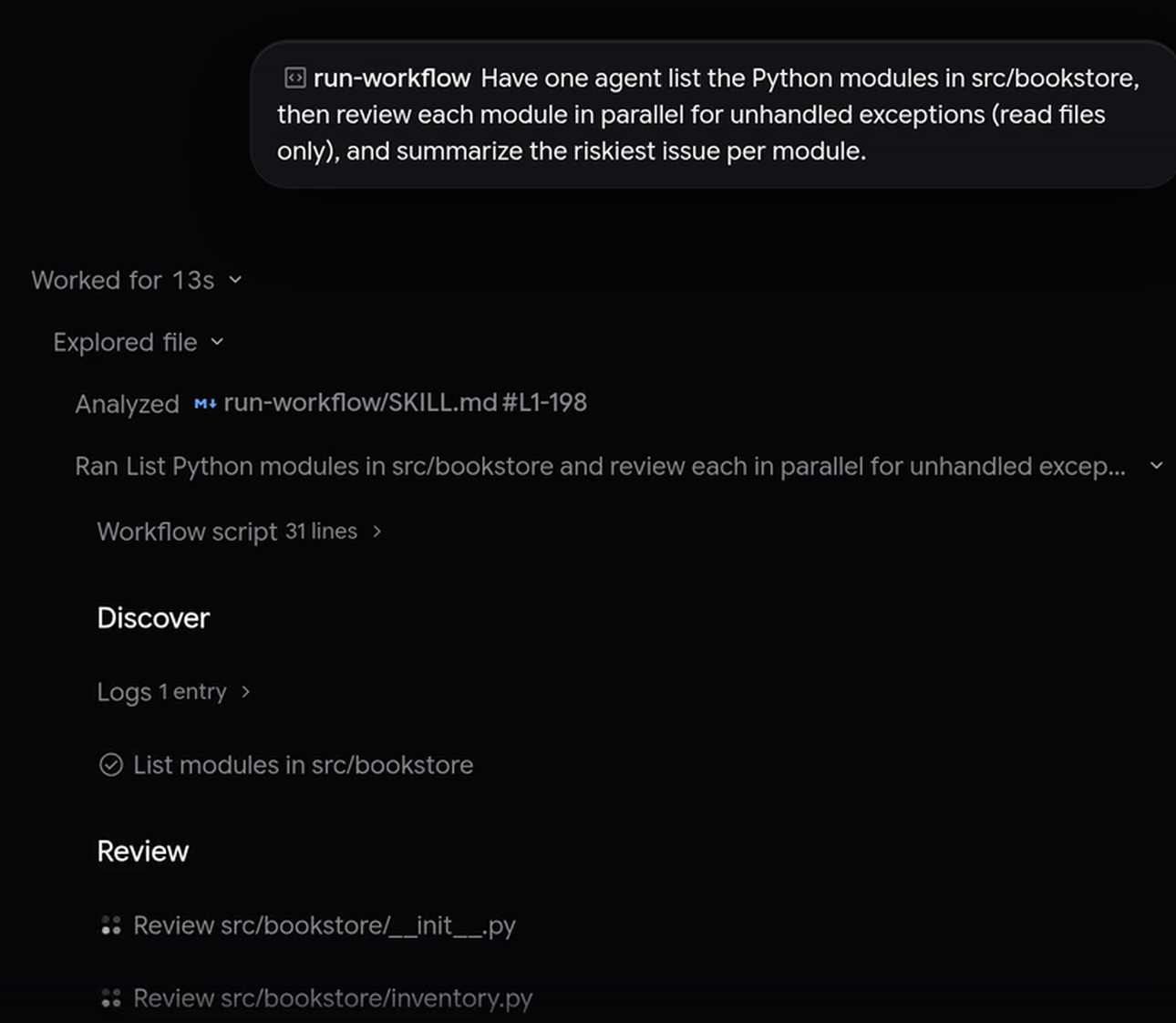
Click an agent card to open that agent’s conversation in the side panel, where you can read its prompt, watch its tool calls, approve its pending requests, or send it a message. Workflow agents don’t appear in your main conversation list; you open them from their cards.
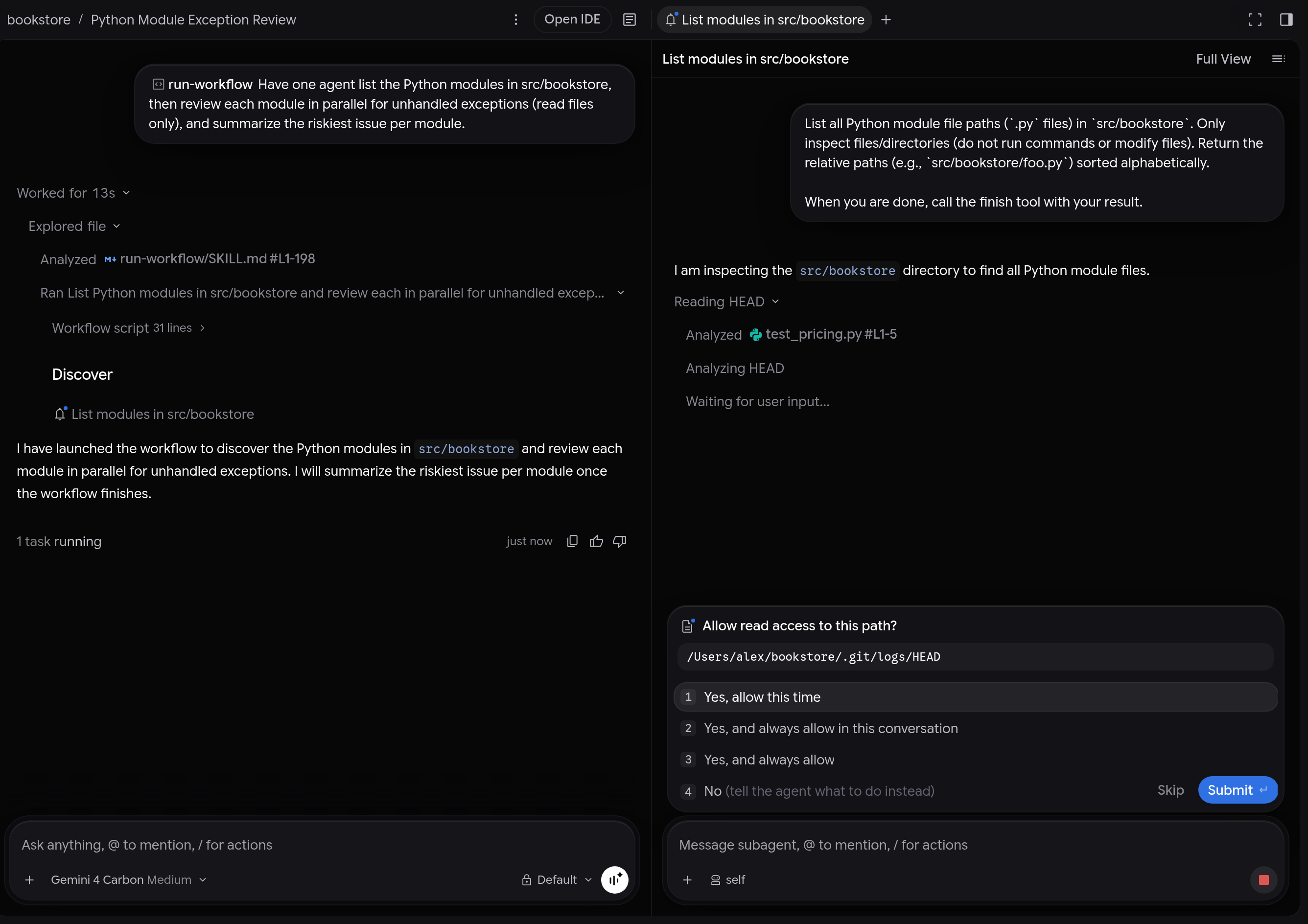
When the workflow finishes, the main agent reads its results and replies in the conversation. To stop a workflow early, stop the conversation. Stopping the parent conversation also stops every running workflow agent.
Antigravity CLI
Section titled “Antigravity CLI”Dynamic Workflows in the Antigravity CLI: type /run-work, press Tab to complete /run-workflow, add your task, approve the script, press Ctrl+O to expand the phase tree while agents run, and read the results. Parts of the video are sped up.
Launch a workflow
Section titled “Launch a workflow”At the prompt, type /run-workflow followed by your task. To save typing,
enter /run-work and press Tab to complete the command name, and
then add a space and your task:
/run-workflow Find the Python modules in src/bookstore, then review each module in parallel for unhandled exceptions (read files only) and give me a one-line verdict per module.Unless your permission preset already allows it, the CLI shows the generated Python script under Requesting permission for: and asks Run this command?. Choose Yes, run command to start the workflow, or No, cancel to stop it.
Follow phases and agents
Section titled “Follow phases and agents”The workflow keeps running in the background, so the prompt is free while it works. A status row above the prompt shows the workflow’s description, its current phase, and its agent count, and the status line shows 1 task(s) · /tasks.
In the transcript, the workflow step shows the current phase and how many
agents have finished. Press Ctrl+O to expand the step
into a tree of collapsible ▸ Workflow script, ▸ Logs, and ▸ Output rows
(with their line or entry counts) and each phase’s agents with their status,
such as Running, Idle, Needs approval, Canceled, or finished:
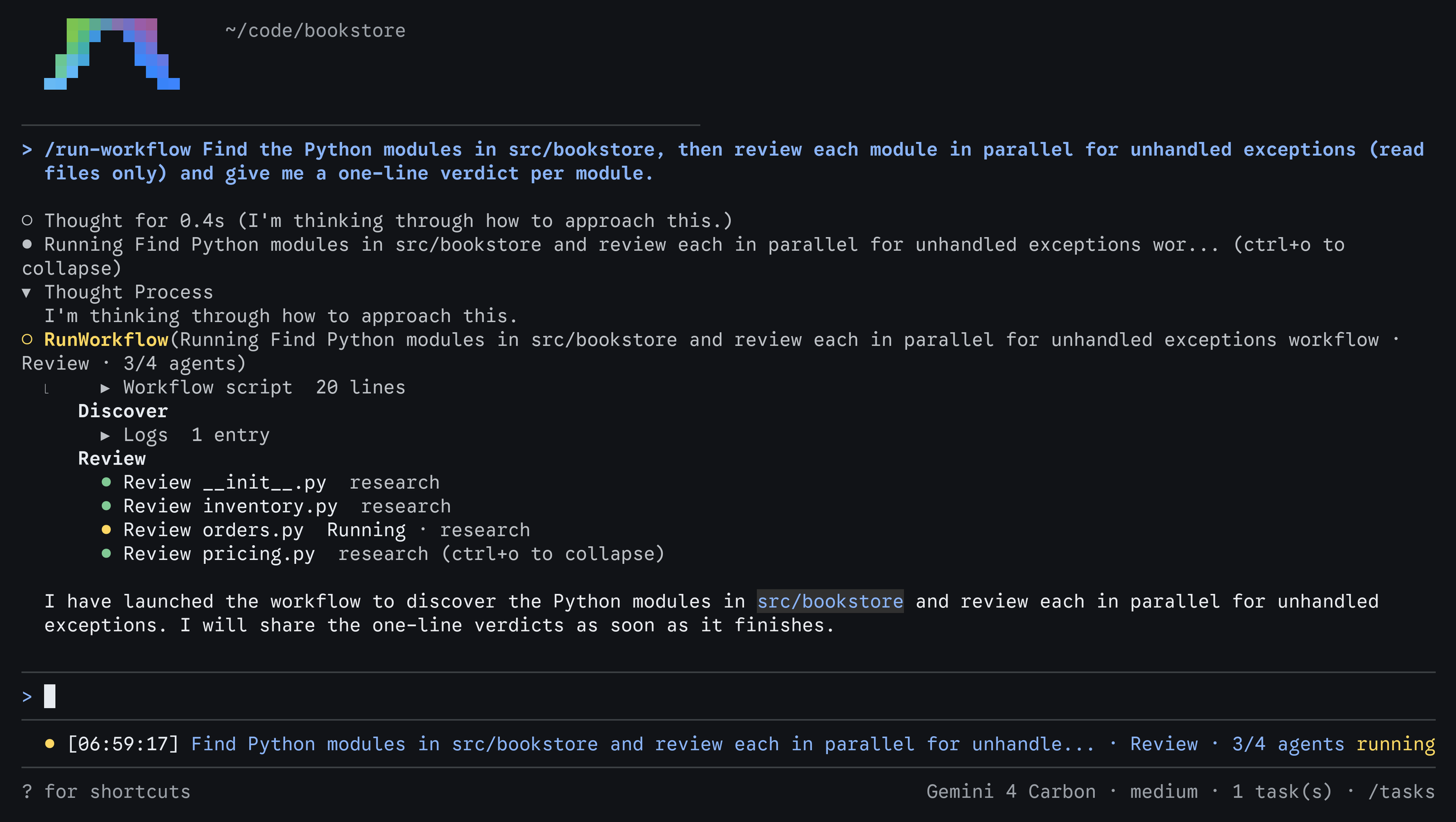
When the workflow finishes, the step title changes from Running to Ran, and the agent replies with the results.
Inspect the workflow and its agents
Section titled “Inspect the workflow and its agents”To open a workflow’s full tree, do the following:
-
Run
/tasks(or press Ctrl+T), highlight the workflow task, and press Enter to open Task Details. -
Press ↑/↓ (or j/k) to move through
Workflow script, each phase’sLogsand agent rows, and any finalOutput:- Press Enter on
Workflow script,Logs, orOutputto expand or collapse its contents in place. - Press Enter on an agent row to open that agent’s conversation.
- Press Enter on
-
Press Esc to go back.
When a workflow agent is waiting for your approval, press Alt+J to jump to it, or press Ctrl+K to approve the pending request without leaving the main conversation.
Example prompts
Section titled “Example prompts”/run-workflow works best when a task splits into many independent items,
staged phases, or review-and-fix loops. Describe the outcome you want; the agent
writes the script.
Review changed files in parallel
Section titled “Review changed files in parallel”One phase discovers the items, and a second phase processes all of them at the same time:
/run-workflow List the Python files changed since main, then review each file in parallel for unhandled exceptions using the flash model, and log a one-line verdict per file.Review, fix in parallel, and verify
Section titled “Review, fix in parallel, and verify”A multi-turn reviewer keeps its notes across phases while parallel fixers address its findings:
/run-workflow Have a persistent Reviewer agent list the bugs in src/billing, fan out one Fixer agent per bug in parallel, and then ask the same Reviewer to confirm that every bug it found is fixed.Edit in isolated workspaces
Section titled “Edit in isolated workspaces”Give each parallel agent its own isolated workspace when they edit code and run tests at the same time:
/run-workflow For each package under packages/, start one agent in an isolated branch workspace to replace the deprecated request() helper with fetchJson(), run npm test in that package, and log a diff summary and the test result.Test, then fix, one item at a time
Section titled “Test, then fix, one item at a time”Process items in sequence when they touch shared files or test suites:
/run-workflow Process BUG-1.md and BUG-2.md one at a time: for each bug, have one agent write a failing pytest test and a second agent fix the code until the new test passes.Read and steer workflow scripts
Section titled “Read and steer workflow scripts”You don’t need to write Python to use Dynamic Workflows. Because Antigravity shows you the script before it runs, knowing the building blocks helps you review what a workflow will do and ask for specific options in your prompt.
Example script
Section titled “Example script”The following script is the kind that the agent writes for the parallel review prompt above:
phase("Discover")
files = await agent(
    "List the Python files changed since main. Paths only.",
    schema={"type": "array", "items": {"type": "string"}},
)

phase("Review")
# parallel() runs one agent per file at the same time.
# role titles each agent's card.
reviews = await parallel(
    files,
    lambda f: agent(
        f"Review {f} for unhandled exceptions. Reply with a one-line verdict.",
        schema={"type": "string"},
        role=f"Review {f}",
        model="flash",
    ),
)
for r in reviews:
    log(r)
Script building blocks
Section titled “Script building blocks”Every workflow script can use the following functions and values:
| Building block | What it does |
|---|---|
phase(name) | Starts a named phase. Later logs, tool calls, and agent cards are grouped under it. |
log(*args) | Adds a line to the current phase in the workflow step and to the result that the main agent receives. |
agent(prompt, schema, role, type_name, workspace, model) | Defines an agent. await agent(prompt, schema) runs it once and returns its result. a = agent(...) followed by await a(prompt, schema) runs one turn of a conversation that lasts across calls. |
parallel(items, fn) | Runs fn(item) for every item at the same time and returns the results in item order. If one item fails, the others are canceled. |
pipeline(items, fn) | Runs fn(item) for one item at a time and returns the results in item order. |
await trajectory(...) | Returns earlier steps of the current conversation (before the workflow started), optionally filtered by step type, tool name, index range, or the last N steps. |
args | A dictionary of optional arguments that the agent passes to the script (empty when there are none). |
CONVERSATION_ID, STEP_INDEX, WORKSPACES | The conversation ID, the index of the workflow step, and your workspace folders (primary first). The script runs in your primary workspace folder. |
The schema of an agent is a JSON Schema for its result. The agent returns
its result through a finish tool that checks it against the schema, and the
script receives the parsed value. Use {"type": "string"} for a free-form
answer.
When you prompt /run-workflow, you can ask the agent to customize how its
agents run:
- Model (
model): By default, workflow agents use your conversation’s model (inherit). Ask for a lighter tier, such asflash_liteorflash, for fast, high-volume checks across many files, or forprofor deeper reasoning. An agent fails with the list of valid choices if a tier isn’t available to you. - Agent type (
type_name):self(the default) uses the current agent’s configuration and tools. You can also use the built-inresearchagent for read-only codebase research, or the name of one of your custom subagents. - Workspace (
workspace):inherit(the default) uses your current workspace.branchgives each agent its own isolated Git worktree, which is useful when agents edit code in parallel.sharegives each agent a new working copy that shares the underlying repository storage.
Re-run a workflow script
Section titled “Re-run a workflow script”If you run the same kind of workflow regularly, you can keep the script instead
of having the agent regenerate it each time. Ask the agent to save the script to
a .py file in your workspace, then run it again with a prompt such as
/run-workflow Run scripts/review-changes.py. Antigravity asks you to approve
the script each time it runs, unless you’ve chosen to always allow it.
Permissions
Section titled “Permissions”Dynamic Workflows follow your permission settings:
- Approving the script: Antigravity asks you to approve each workflow script before it runs, unless your permission preset already allows it. You can allow it once, for the rest of the conversation, or always. An approval covers that exact script; a command prefix rule can’t cover a Python script.
- Agents ask in their own conversations: Each agent that a workflow starts follows your permission preset and asks for approval in its own conversation. The agent waits until you answer.
Choose between Dynamic Workflows, subagents, and agent teams
Section titled “Choose between Dynamic Workflows, subagents, and agent teams”Antigravity offers several ways to split work across agents:
| Use | When you want |
|---|---|
| Orchestrator | A single conversation where a frontier planner model (Gemini 4 Carbon or Gemini 4 Argon) plans and reviews while routing routine tool execution to Gemini 4 Hydrogen. |
| Subagents | To delegate one task, such as a research question or a build, while you keep working. |
Dynamic Workflows (/run-workflow) | Predictable, scripted control flow: the same check across a list of files or packages, staged steps in sequence, or a reviewer-and-fixer loop where agents return structured results to a script instead of talking to each other. |
/swarm | Peers collaborating on a shared message board to split a feature, bug bash, or investigation and coordinate directly (@name). |
/boost | Deep reasoning on a hard bug, race condition, or algorithm, with independent verification. |
/teamwork | A collaborative agent team for a large, multi-milestone project, starting with a scoping interview. |
If your agents need to coordinate with each other while they work, for example
to agree on interfaces or review each other’s diffs on a shared message board,
use /swarm instead of a workflow.
Related documentation
Section titled “Related documentation”- Custom subagents: Learn how agents run in the background,
and define your own agent types to use as
type_name. - Agent swarms (
/swarm): Coordinate a team of agents collaborating on a shared message board. - Models and Orchestrator: Compare available models and learn how Orchestrator pairs a frontier planner with Gemini 4 Hydrogen.
- Slash commands: Browse every slash command in Antigravity.
- Skills: Package reusable instructions. To convert legacy Markdown workflows, see the workflows to skills migration guide.
- Customization discovery: Learn where Antigravity looks for workspace and personal customizations.
- Permissions: Configure presets and allow, ask, and deny rules.