

Grill me command (/grill-me)
Section titled “Grill me command (/grill-me)”Have the agent interview you about a task before it starts work. With
/grill-me, the agent asks one question at a time and recommends an answer for
each. It explores your codebase instead of asking you anything the code can
answer, and keeps going until you both share the same understanding of the
task.
Overview
Section titled “Overview”A short request such as “add rate limiting” leaves many decisions open: which limits apply to which users, where request counts are stored, and what the API returns when a client is throttled. Without more detail, the agent fills those gaps with its own assumptions, which might not match what you had in mind.
The /grill-me command asks the agent to settle those decisions with you
before it starts work. The interview changes only how the agent gathers
requirements. Your tool permissions still apply, so you
might be asked to approve commands that the agent runs while it explores.
Start an interview
Section titled “Start an interview”Type /grill-me followed by the task you want to discuss. Describe the outcome
you want; the interview fills in the details.
Antigravity App
Section titled “Antigravity App”Type the command in the message box:
/grill-me Add per-user rate limiting to the bookmarks APIEach question replaces the message box at the bottom of the conversation, with the agent’s recommended answer listed first:
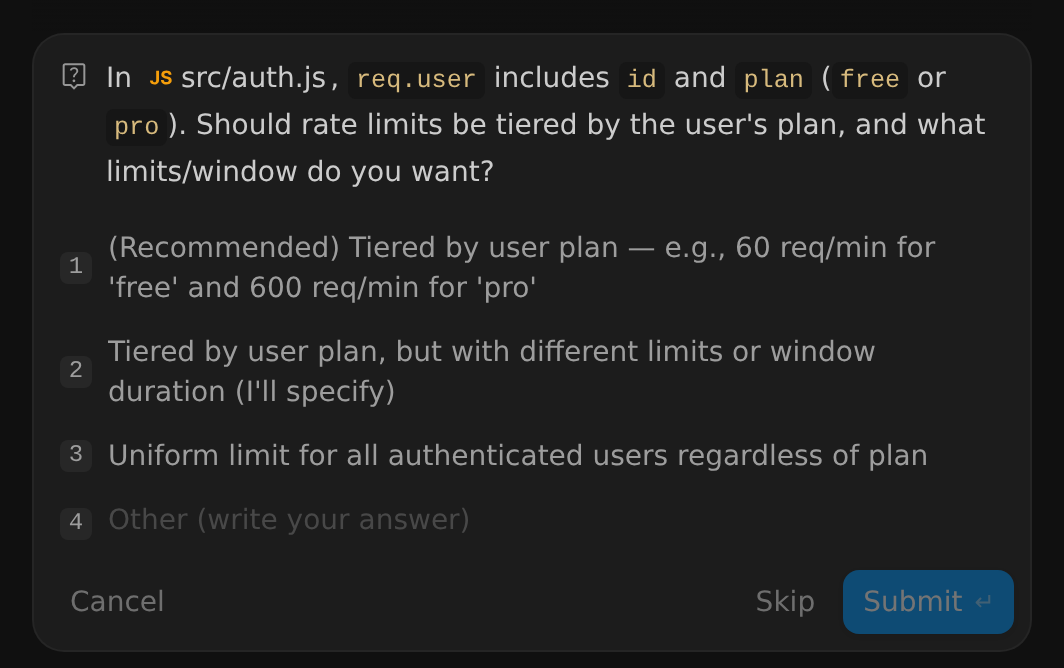
Select an answer, or type your own in Other (write your answer), and then click Submit. Click Skip to skip the question, or Cancel to dismiss it and stop the agent.
Antigravity CLI
Section titled “Antigravity CLI”Type the command in the interactive prompt:
/grill-me Add per-user rate limiting to the bookmarks APIEach question opens a numbered list of answers in the terminal, with the agent’s recommended answer first:
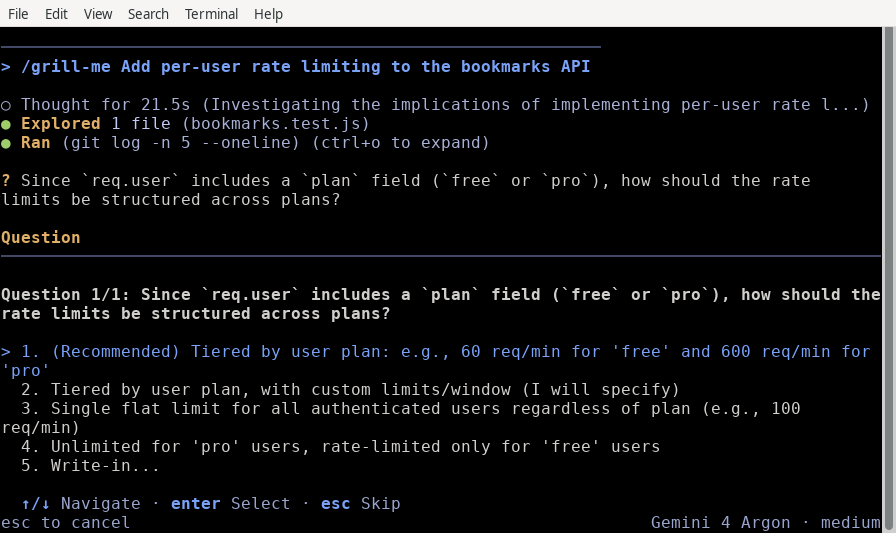
To answer a question:
- Press ↑/↓ to highlight an answer and Enter to select it, or press the answer’s number.
- Select Write-in… to type your own answer, then press Enter to submit it.
- Press Esc to skip the question.
If you run /grill-me without a task, the agent typically explores the
workspace and starts by asking what you want to work on.
How an interview works
Section titled “How an interview works”- The agent explores the codebase. When the code can answer a question, the agent reads the code instead of asking you, so its questions build on what’s already there.
- It asks one question at a time. Each question offers a few answers, with the agent’s recommendation listed first and marked (Recommended), plus a field for writing your own answer.
- Each answer shapes the next question. The agent walks down each branch of the design, resolving dependencies between decisions one by one.
- The interview ends when you’re aligned. When no open questions remain,
the agent continues with the task using your answers. To review a written
plan before any code changes, combine it with
/plan.
Combine with /plan
Section titled “Combine with /plan”To turn your answers into a plan you can review, stack /plan
and /grill-me in the same prompt:
/plan /grill-me Add per-user rate limiting to the bookmarks APIThe agent interviews you one question at a time, then writes an implementation plan based on your answers. Unless your artifact review policy is set to Always proceed, the agent then waits for you to review and approve the plan before it changes any code. In the Antigravity App, click Proceed to approve it.
When to use /grill-me
Section titled “When to use /grill-me”/grill-me is most useful when a task has open decisions that the code can’t
settle on its own:
- Underspecified features: turning a short request into concrete endpoints, data models, and validation rules.
- Design trade-offs: choosing between caching strategies, storage backends, concurrency models, or authentication flows.
- Risky refactors: agreeing on compatibility, migration, and testing expectations before shared code changes.
- Testing your own design: having the agent probe your assumptions for gaps and edge cases before you commit to an approach.
If you want a written plan to review and approve before any code changes, use
/plan instead, or combine the two.
Next steps
Section titled “Next steps”Explore related planning and workflow documentation:
- Plan command (
/plan): Get a reviewable implementation plan before the agent modifies code. - Implementation plan artifact: Learn how to review, comment on, and approve plan artifacts.
- Goal command (
/goal): Run a long task autonomously once you’ve agreed on the design. - Slash commands overview: Browse every available slash command.