

Agent permissions
Section titled “Agent permissions”Antigravity uses a unified fine-grained permission engine to evaluate sensitive tool operations across Deny, Ask, and Allow access lists. If you are using Antigravity with Gemini Enterprise, see Antigravity in Gemini Enterprise.
Antigravity App
Section titled “Antigravity App”Updated permission settings
Section titled “Updated permission settings”Antigravity uses a robust, unified permission engine to secure your environment while enabling autonomous workflows. Every sensitive operation the agent performs is represented as a permission resource formatted as action(target).
Permissions are evaluated across three distinct access lists:
- Deny: The action is blocked immediately.
- Ask: The agent pauses and prompts for your explicit approval before proceeding.
- Allow: The action is allowed without prompting.
Permission presets
Section titled “Permission presets”The permission preset controls how agent actions are approved. Your configured allow, deny, and ask rules are layered on top of the preset and always take precedence:
| Preset | Terminal sandbox | Terminal Commands | File Access | MCP & Web |
|---|---|---|---|---|
| Request Review | Disabled | Always ask | Workspace only | Ask |
| Default | Enabled | Allowed in sandbox; ask outside | Workspace + temp dirs | Ask |
| Auto (Preview) | Enabled | Allowed in sandbox; checked automatically outside | Workspace + temp dirs | Ask |
| Turbo | Disabled | Allowed (unrestricted) | Full filesystem | Allowed |
The two presets that use the sandbox work as follows:
- Default (“Ask before sensitive operations.”): Terminal commands run inside the isolated Terminal sandbox with access restricted to your workspace and temp directories and no network access. When a command needs network connectivity or host resources, the agent requests to run it outside the sandbox—prompting for your approval unless covered by a
command(...)allow rule. - Auto (Preview) (“Automatically decide if commands run.”): Commands also run inside the terminal sandbox by default. When a command needs to run outside the sandbox, Antigravity automatically evaluates it so safe, reversible commands run without prompting, while risky or irreversible commands still ask for your approval.
Refer to Agent settings for more detail on each preset.
Change your permission preset
Section titled “Change your permission preset”You can set a preset for all projects, override it for a single project, or switch presets from the message box.
For all projects
Section titled “For all projects”To change the preset for all projects, open Settings > General > Global Permissions > Permission Preset:
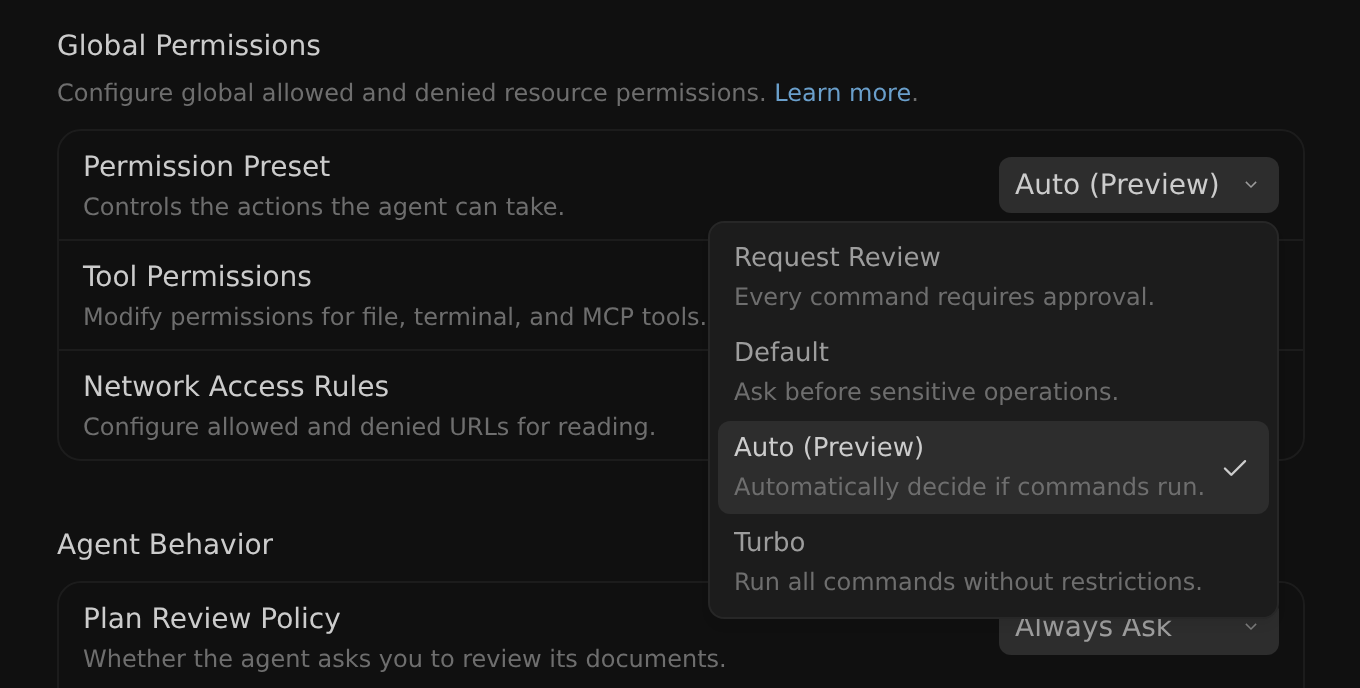
The checkmark marks your current global preset.
For a single project
Section titled “For a single project”To override the global preset for a single project, change the project’s preset under Settings > Projects. New projects default to Inherit Global, which follows your global preset.
From the message box
Section titled “From the message box”In v2.23.0+, you can also choose a preset from the permissions picker in the message box:
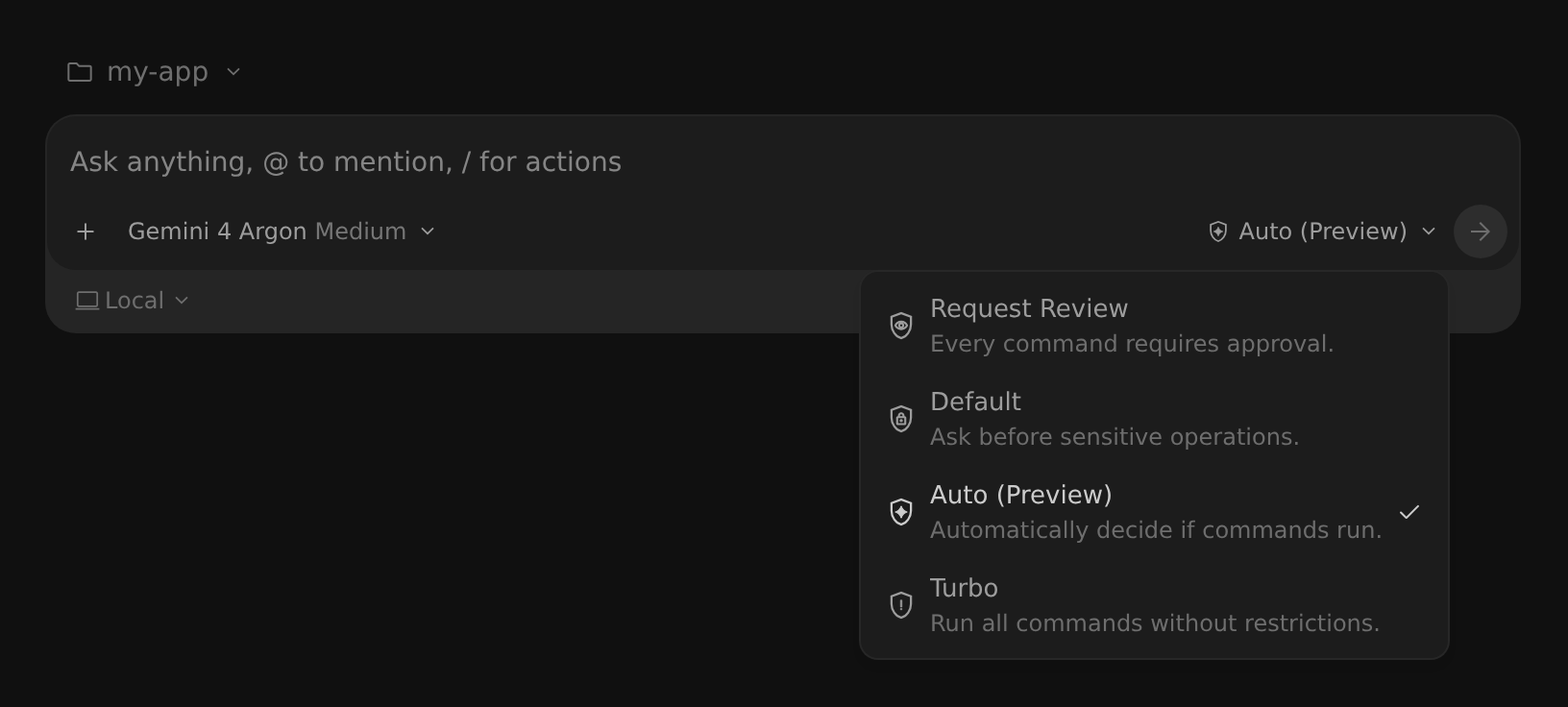
The picker changes your global preset, or the project’s preset if the project overrides it. To remove a project override, choose Use Global Settings.
Supported actions and matching rules
Section titled “Supported actions and matching rules”The following table lists the supported permission actions, their target formats, and their default behavior:
| Action | Target Format | Default Fallback |
|---|---|---|
read_file | read_file(/path), read_file(dir), or read_file(*) | Ask (Allowed in workspace) |
write_file | write_file(/path) or write_file(*) | Ask (Allowed in workspace) |
read_url | read_url(domain) or read_url(*) | Ask |
execute_url | execute_url(domain) or execute_url(*) | Ask |
command | command(prefix), command(regex:pattern), or command(*) | Ask (Allowed in sandbox under the Default and Auto presets) |
mcp | mcp(server/tool), mcp(server/*), or mcp(*) | Ask |
Each action matches its target as follows:
read_file: Matches absolute paths or paths relative to project workspace roots. Grants recursive read access to all contained files and folders. Usingread_file(*)matches all files on the system.write_file: Same asread_file. Implicitly grantsread_filefor the exact same target path.read_url: Matches hostnames and subdomains (for example,google.comcoversmail.google.com). Ignores URL path segments. Usingread_url(*)matches any domain.execute_url: Covers actuating on web elements (clicking, typing) or driving interactive browser workflows on a domain.command: Matches by exact word or token prefix literally by default. To match by regular expression, start the target with theregex:prefix (each whitespace-separated token is evaluated as an anchored regular expression^(?:pattern)$, for example,command(regex:npm run (build.*))). Covers execution both inside and outside the sandbox.mcp: Matches exact MCP tools or all tools on a specified server (applies equally to local and remote MCP servers). Usingmcp(*)matches any tool.
When commands require an exact match
Section titled “When commands require an exact match”Certain shell constructs can hide arbitrary command execution behind an otherwise benign prefix—for example, command or process substitution ($(...), backticks, <(...)), arithmetic contexts ($((...))), brace expansion ({a,b}), non-literal command names, network or file descriptor redirections, and developer-tool flags that execute subcommands (such as git -c core.pager=<cmd> or tar --to-command). When Antigravity detects any of these (or cannot cleanly parse the command), it disables prefix matching for the entire command line: the command runs without prompting only if a rule matches the full line character-for-character (or across the full raw line for regex: rules), and otherwise falls back to Ask.
Standard shell composition still prefix-matches normally: pipelines, &&/||/; chains, quoted literals, plain $VAR arguments, simple file redirects, and transparent wrappers (timeout, nohup, nice, env, whose inner command is evaluated on its own). For example, with command(git) in your Allow list, git status && git log runs without prompting, while git log $(whoami) prompts for approval.
Understanding read_url and execute_url across the platform
Section titled “Understanding read_url and execute_url across the platform”The read_url permission governs outbound web connectivity across three distinct areas of Antigravity:
- Web page reading: When the agent fetches web page Markdown for research, it checks your
read_urlgrants. - Browser subagent and tool: When driving Chrome sessions,
read_urlauthorizes loading and viewing the target domain. However, interactive UI actuation (clicking buttons, typing text) is governed independently byexecute_url. - Terminal sandboxing: Any domain granted under
read_urlis compiled directly into the sandbox’s outbound network allowlist, permitting commands likecurlornpmto connect to authorized hosts.
Cross-platform command and path matching
Section titled “Cross-platform command and path matching”Antigravity ensures your permission rules work consistently whether you’re developing on macOS, Linux, or Windows. On macOS and Linux, paths use standard forward slashes (/). On Windows, Antigravity automatically normalizes paths prior to rule evaluation by stripping drive letters (for example, C:) and converting all backslashes (\) to forward slashes (/).
Implicit permission rules
Section titled “Implicit permission rules”Antigravity applies the following implicit permission rules:
- Write implies read: Allowing
write_fileon a path automatically grantsread_fileon that path. - Deny read implies deny write: Denying
read_fileon a path immediately blockswrite_fileon that path.
Interactive permission prompts
Section titled “Interactive permission prompts”When the agent encounters an operation requiring approval (Ask mode), an interactive card appears in your editor. Before clicking Allow for file, URL, or MCP permissions, you can directly edit the target string in the prompt card to expand the granted scope (for example, broadening a single file request like /project/file.txt to the parent directory /project). Antigravity validates that your edited target safely covers the operation and applies the expanded grant for the remainder of the turn, preventing repeated prompts for related operations. (Note: Scope editing isn’t supported for terminal commands).
Terminal commands and the sandbox
Section titled “Terminal commands and the sandbox”Under the Default and Auto (Preview) presets, the agent runs terminal commands inside an isolated Terminal sandbox, which by default has access only to your workspace and system temp directories, and no network access. Commands can run without manual approval in the sandbox, and your permission grants can further shape what the sandbox can reach:
- Paths granted under
read_filedynamically populate the sandbox’s read-only filesystem allowlist. - Paths granted under
write_filedynamically populate the sandbox’s read-write filesystem allowlist. - Domains granted under
read_urldefine outbound network access policies.
Because some commands cannot run in the sandbox—for example, those requiring network access—the agent can still choose to run commands outside the sandbox:
- Default: Such commands prompt for your approval unless already allowed or denied by a
commandrule. - Auto (Preview) (
v2.23.0+): Antigravity automatically evaluates commands that need to run outside the sandbox so safe, reversible commands proceed without prompting, while risky or irreversible commands still require approval.
Default system behaviors and guardrails
Section titled “Default system behaviors and guardrails”When an action isn’t explicitly listed in your Allow, Deny, or Ask lists, Antigravity falls back to secure system defaults:
- Commands: Under the Default preset, commands run without prompting inside the sandbox and require approval to run outside it. Under Auto (Preview), safe commands outside the sandbox run without prompting, while sensitive or irreversible commands pause for approval.
- Workspace files: Reading and writing files inside your active project directory is allowed without prompting, while non-workspace files require approval.
- Web browsing defaults to Ask: Actions for
read_urlandexecute_urldefault to Ask. Before the agent navigates to or actuates on any web page, it pauses and prompts for your explicit approval unless an allow rule is configured. - MCP tools default to Ask: Unconfigured MCP tool calls prompt for approval.
Configuration examples
Section titled “Configuration examples”The following examples show rules for the Allow list, which defines actions that run without prompting:
command(git)                             # Standard git commands
command(regex:npm run (build|lint|test)) # Allow safe npm scripts using regex
command(git push)                        # Allow git push, inside or outside the sandbox
read_file(/var/log/app)                  # Read external log paths
write_file(src/)                         # Edit relative src/ folder
read_url(google.com)                     # Fetch Google subdomains
mcp(linter/*)                            # Run linter MCP tools
The following examples show rules for the Deny list, which defines actions that are permanently blocked:
command(rm -rf)                    # Block destructive deletions
command(regex:curl .*)             # Block unvetted curl downloads
command(sudo)                      # Block sudo privileges
write_file(.git/)                  # Safeguard Git history
write_file(/home/user/.ssh)        # Safeguard SSH keys
The following examples show rules for the Ask list, which defines actions that pause for manual confirmation:
command(*)                         # Prompt all commands
execute_url(aws.amazon.com)        # Prompt AWS console actuation
mcp(sql/execute_mutation)          # Prompt modifying SQL queries
Previous permission settings
Section titled “Previous permission settings”Antigravity uses a robust, unified permission engine to secure your environment while enabling autonomous workflows. Every sensitive operation the agent performs is represented as a permission resource formatted as action(target).
Permissions are evaluated across three distinct access lists:
- Deny: The action is blocked immediately.
- Ask: The agent pauses and prompts for your explicit approval before proceeding.
- Allow: The action is allowed without prompting.
Supported actions and matching rules
Section titled “Supported actions and matching rules”The following table lists the supported permission actions in the previous permission settings, their target formats, and their default behavior:
| Action | Target Format | Default Fallback |
|---|---|---|
read_file | read_file(/path), read_file(dir), or read_file(*) | Ask (Allowed in workspace) |
write_file | write_file(/path) or write_file(*) | Ask (Allowed in workspace) |
read_url | read_url(domain) or read_url(*) | Ask |
execute_url | execute_url(domain) or execute_url(*) | Ask |
command | command(prefix), command(regex:pattern), or command(*) | Ask |
unsandboxed | unsandboxed(prefix), unsandboxed(regex:pattern), or unsandboxed(*) | Ask |
mcp | mcp(server/tool), mcp(server/*), or mcp(*) | Ask |
Each action matches its target as follows:
read_file: Matches absolute paths or paths relative to project workspace roots. Grants recursive read access to all contained files and folders. Usingread_file(*)matches all files on the system.write_file: Same asread_file. Implicitly grantsread_filefor the exact same target path.read_url: Matches hostnames and subdomains (for example,google.comcoversmail.google.com). Ignores URL path segments. Usingread_url(*)matches any domain.execute_url: Covers actuating on web elements (clicking, typing) or driving interactive browser workflows on a domain.command: Matches by exact word or token prefix literally by default. To match by regular expression, start the target with theregex:prefix (each whitespace-separated token is evaluated as an anchored regular expression^(?:pattern)$, for example,command(regex:npm run (build.*))).unsandboxed: Matches command prefixes word-by-word literally by default (or withregex:). Commands matching this grant execute outside container isolation when terminal sandboxing is enabled.mcp: Matches exact MCP tools or all tools on a specified server (applies equally to local and remote MCP servers). Usingmcp(*)matches any tool.
When commands require an exact match
Section titled “When commands require an exact match”Certain shell constructs can hide arbitrary command execution behind an otherwise benign prefix—for example, command or process substitution ($(...), backticks, <(...)), arithmetic contexts ($((...))), brace expansion ({a,b}), non-literal command names, network or file descriptor redirections, and developer-tool flags that execute subcommands (such as git -c core.pager=<cmd> or tar --to-command). On Windows shells like PowerShell or Command Prompt, commands whose syntax cannot be cleanly split into separate words also fall into this category. When Antigravity detects any of these, it disables prefix matching for the entire command line: the command runs without prompting only if a rule matches the full line character-for-character (or across the full raw line for regex: rules, such as command(regex:git .*)), and otherwise falls back to Ask.
Standard shell composition still prefix-matches normally: pipelines, &&/||/; chains, quoted literals, plain $VAR arguments, simple file redirects, and transparent wrappers (timeout, nohup, nice, env, whose inner command is evaluated on its own). For example, with command(git) in your Allow list, git status && git log runs without prompting, while git log $(whoami) prompts for approval.
Understanding read_url and execute_url across the platform
Section titled “Understanding read_url and execute_url across the platform”The read_url permission governs outbound web connectivity across three distinct areas of Antigravity:
- Web page reading: When the agent fetches web page Markdown for research, it checks your
read_urlgrants. - Browser subagent and tool: When driving Chrome sessions,
read_urlauthorizes loading and viewing the target domain. However, interactive UI actuation (clicking buttons, typing text) is governed independently byexecute_url. - Terminal sandboxing: In sandbox mode, any domain granted under
read_urlis compiled directly into the container’s outbound network allowlist (AllowedDomains), permitting commands likecurlornpmto connect to authorized hosts.
Cross-platform command and path matching
Section titled “Cross-platform command and path matching”Antigravity ensures your permission rules work consistently whether you’re developing on macOS, Linux, or Windows. On macOS and Linux, paths use standard forward slashes (/). On Windows, Antigravity automatically normalizes paths prior to rule evaluation by stripping drive letters (for example, C:) and converting all backslashes (\) to forward slashes (/).
Implicit permission rules
Section titled “Implicit permission rules”Antigravity applies the following implicit permission rules:
- Write implies read: Allowing
write_fileon a path automatically grantsread_fileon that path. - Deny read implies deny write: Denying
read_fileon a path immediately blockswrite_fileon that path.
Interactive permission prompts
Section titled “Interactive permission prompts”When the agent encounters an operation requiring approval (Ask mode), an interactive card appears in your editor. Before clicking Allow for file, URL, or MCP permissions, you can directly edit the target string in the prompt card to expand the granted scope (for example, broadening a single file request like /project/file.txt to the parent directory /project). Antigravity validates that your edited target safely covers the operation and applies the expanded grant for the remainder of the turn, preventing repeated prompts for related operations. (Note: Scope editing isn’t supported for terminal commands).
Terminal sandboxing (preview)
Section titled “Terminal sandboxing (preview)”Permission grants also apply to commands when the sandbox is enabled:
- Paths granted under
read_filedynamically populate the sandbox’s read-only filesystem allowlist. - Paths granted under
write_filedynamically populate the sandbox’s read-write filesystem allowlist. - Domains granted under
read_urldefine outbound network access policies.
Default system behaviors and guardrails
Section titled “Default system behaviors and guardrails”When an action isn’t explicitly listed in your Allow, Deny, or Ask lists, Antigravity falls back to secure system defaults:
- Commands default to Ask: Unconfigured terminal commands (
commandandunsandboxed) require manual approval unless configured to run without prompting in your settings. - Workspace files: Reading and writing files inside your active project directory is allowed without prompting, while non-workspace files require approval.
- Web browsing defaults to Ask: Actions for
read_urlandexecute_urldefault to Ask. Before the agent navigates to or actuates on any web page, it pauses and prompts for your explicit approval unless an allow rule is configured. - MCP tools default to Ask: Unconfigured MCP tool calls prompt for approval.
Configuration examples
Section titled “Configuration examples”The following examples show rules for the Allow list, which defines actions that run without prompting:
command(git)                             # Standard git commands
command(regex:npm run (build|lint|test)) # Allow safe npm scripts using regex
unsandboxed(git push)                    # Allow git push outside sandbox
read_file(/var/log/app)                  # Read external log paths
write_file(src/)                         # Edit relative src/ folder
read_url(google.com)                     # Fetch Google subdomains
mcp(linter/*)                            # Run linter MCP tools
The following examples show rules for the Deny list, which defines actions that are permanently blocked:
command(rm -rf)                    # Block destructive deletions
command(regex:curl .*)             # Block unvetted curl downloads
command(sudo)                      # Block sudo privileges
write_file(.git/)                  # Safeguard Git history
write_file(/home/user/.ssh)        # Safeguard SSH keys
The following examples show rules for the Ask list, which defines actions that pause for manual confirmation:
command(*)                         # Prompt all commands
execute_url(aws.amazon.com)        # Prompt AWS console actuation
mcp(sql/execute_mutation)          # Prompt modifying SQL queries
Antigravity CLI
Section titled “Antigravity CLI”CLI fine-grained permissions
Section titled “CLI fine-grained permissions”To secure your workstation while enabling autonomous workflows, Antigravity CLI integrates a robust fine-grained permissions engine. Every sensitive operation the agent performs is represented as a permission resource formatted as action(target).
Permissions are evaluated across three distinct access lists configured inside your global settings (~/.gemini/antigravity-cli/settings.json):
deny: The action is blocked immediately.ask: The agent pauses and prompts for your explicit approval before proceeding.allow: The action is auto-approved without prompting.
Supported CLI actions and matching rules
Section titled “Supported CLI actions and matching rules”Fine-grained permissions follow a standard schema pattern:
action(target)The supported actions, target format specifications, and default fallbacks are listed in the following table:
| Action | Target Format | Default Fallback |
|---|---|---|
read_file | read_file(/path), read_file(dir), or read_file(*) | Ask (Auto-allowed in workspace) |
write_file | write_file(/path) or write_file(*) | Ask (Auto-allowed in workspace) |
read_url | read_url(domain) or read_url(*) | Ask |
execute_url | execute_url(domain) or execute_url(*) | Ask |
command | command(prefix), command(regex:pattern), or command(*) | Ask |
unsandboxed | unsandboxed(prefix), unsandboxed(regex:pattern), or unsandboxed(*) | Ask |
mcp | mcp(server/tool), mcp(server/*), or mcp(*) | Ask |
The matching algorithm for each action is as follows:
read_file: Matches absolute paths or paths relative to workspace roots. Grants recursive read access to all contained files and folders.read_file(*)matches all files on the system.write_file: Same asread_file. Implicitly grantsread_filefor the exact same target path.read_url: Matches hostnames and subdomains (for example,google.comcoversmail.google.com). Ignores URL path segments.read_url(*)matches any domain.execute_url: Covers actuating on web elements (clicking, typing) or driving interactive browser workflows on a domain.command: Matches command prefixes word-by-word literally by default. If you want to use a regular expression, add theregex:prefix (for example,command(regex:npm run (build|lint|test))). Covers the command whether it runs inside or outside the terminal sandbox.unsandboxed: Business and enterprise accounts only. Other accounts ignoreunsandboxedrules and show a warning; usecommandinstead. Matches command prefixes word-by-word literally by default (or withregex:). Commands matching this grant execute outside container isolation when terminal sandboxing is enabled.mcp: Matches exact MCP tools or all tools on a specified server (applies to local and remote MCP servers).mcp(*)matches any tool.
CLI global wildcard syntax
Section titled “CLI global wildcard syntax”Across all supported action types, passing the global wildcard * (such as read_file(*), command(*), and mcp(*)) matches all targets within that entire action namespace.
CLI implicit permission rules
Section titled “CLI implicit permission rules”Antigravity CLI applies the following implicit permission rules:
- Write implies read: Allowing
write_fileon a path automatically grantsread_fileon that path. - Deny read implies deny write: Denying
read_fileon a path immediately blockswrite_fileon that path.
CLI cross-platform path normalization
Section titled “CLI cross-platform path normalization”Antigravity ensures your permission rules work consistently whether you’re
developing on macOS, Linux, or Windows. On macOS and Linux, paths use standard
forward slashes (/). On Windows, Antigravity automatically normalizes paths
prior to rule evaluation by stripping drive letters (for example, C:) and
converting all backslashes (\) to forward slashes (/).
CLI cross-platform command matching
Section titled “CLI cross-platform command matching”On Windows shells like PowerShell or Command Prompt, commands that can’t be
cleanly split into separate words require an exact match by default. To match a
command and its subcommands on Windows, use the regex: prefix (for example,
command(regex:git .*) to allow any git command).
Default CLI system behaviors and guardrails
Section titled “Default CLI system behaviors and guardrails”When an action isn’t explicitly listed in your allow, deny, or ask lists, the system falls back to secure system defaults:
- Workspaces are auto-allowed: In standard operation, reading and writing files inside your active project directory is automatically allowed.
- Web browsing defaults to Ask: Actions for
read_urlandexecute_urldefault to Ask. Before the agent navigates to or actuates on any web page, it pauses and prompts for your approval unless an allow rule is configured. - Unconfigured actions default to Ask: All other unconfigured actions (
command,mcp,execute_url, and non-workspace files) default to Ask, subject to your active execution mode andtoolPermissionsetting.
Execution modes and the terminal sandbox
Section titled “Execution modes and the terminal sandbox”Your fine-grained allow, ask, and deny rules always take precedence (Deny > Ask > Allow). For operations not covered by an explicit rule, Antigravity CLI evaluates your active execution mode (--mode or agentMode in settings.json) and toolPermission policy:
automode (--mode=autoor"agentMode": "auto", Preview): Automatically approves workspace file edits and runs terminal commands inside the Terminal sandbox by default. When a command needs to run outside the sandbox, Antigravity CLI automatically evaluates it so safe, reversible commands run without prompting, while risky or irreversible commands still pause for your approval. When active, the bottom-right status bar displaysautoand the prompt placeholder readsAuto mode: edits & safe commands auto-approved (shift+tab to cycle).accept-editsmode (--mode=accept-edits): Automatically approves workspace file edits and creations while continuing to evaluate shell commands against yourtoolPermissionpolicy and fine-grained rules.toolPermissionoverrides:strictandalways-proceed(--dangerously-skip-permissions) take precedence overautomode. Outsideautomode,proceed-in-sandboxruns sandboxed commands without prompting and asks before commands outside the sandbox. Starting inv1.4.4, if the sandbox isn’t available on your machine,proceed-in-sandboxbehaves likerequest-review(refer to Terminal sandbox).
Refer to Choose an execution mode for details on switching modes with Shift + Tab, --mode, or /config.
Interactive CLI permission prompts
Section titled “Interactive CLI permission prompts”When the agent encounters an operation requiring approval (Ask mode), an interactive prompt card appears in your TUI.
Before confirming Allow for file, URL, or MCP permissions, you can directly edit the target string in the prompt card to expand the granted scope (for example, broadening a single file request like /project/file.txt to the parent directory /project). The CLI validates that your edited target safely covers the operation and applies the expanded grant for the remainder of the turn, preventing repeated prompts for related operations. (Note: Scope editing isn’t supported for terminal commands).
CLI configuration examples
Section titled “CLI configuration examples”Add these rules to your ~/.gemini/antigravity-cli/settings.json file:
{
    "permissions": {
        "allow": [
            "command(git)",
            "command(regex:npm run (build|lint|test))",
            "read_file(/var/log/app)",
            "write_file(src/)",
            "read_url(google.com)",
            "mcp(linter/*)"
        ],
        "deny": [
            "command(rm -rf)",
            "command(regex:curl .*)",
            "command(sudo)",
            "write_file(.git/)",
            "write_file(/home/user/.ssh)"
        ],
        "ask": ["command(*)", "execute_url(aws.amazon.com)", "mcp(sql/execute_mutation)"]
    }
}
Related resources
Section titled “Related resources”Explore related documentation and guides:
- Permissions command: Manage rules interactively in the TUI.
- Sandbox customization: Enforce OS-level container isolation boundaries.
- Plugins and skills: Create your own custom skills and slash commands.
- Settings, rendering, and keybindings: Customize keyboard hotkeys and buffers.