

Teamwork agent teams (/teamwork-preview)
Section titled “Teamwork agent teams (/teamwork-preview)”The /teamwork-preview command runs a collaborative multi-agent team designed
for large software projects, complex simulations, and deep research tasks.
When work spans multiple days, involves refactoring across dozens of files, or
tackles open-ended math and systems challenges, Teamwork coordinates specialized
agents to deliver thoroughly tested, working results.
Overview
Section titled “Overview”Software engineering and scientific research often run into problems that are simply too large or complex for a single agent session to handle reliably:
- Large-scale refactoring and migrations: Upgrading frameworks, modernizing legacy APIs, or changing dozens of files across coupled subsystems.
- Systems research and simulation: Building complex systems—such as cycle-accurate CPU simulators, distributed consensus engines, or kernel subsystems—that require continuous testing against hardware oracles.
- Mathematical proofs and research: Exploring theoretical proofs, deriving mathematical bounds, and running automated counterexample searches.
- Long-running projects without context bloat: Breaking large tasks into modular milestones where agents coordinate through clean artifact handoffs instead of overloading a single conversation context.
Teamwork solves this by pairing specialized agents together, running independent verification checks at every milestone, and working inside isolated project directories.
Multi-agent architecture and roles
Section titled “Multi-agent architecture and roles”Teamwork organizes multi-agent collaboration into clear orchestration, implementation, and verification tiers:
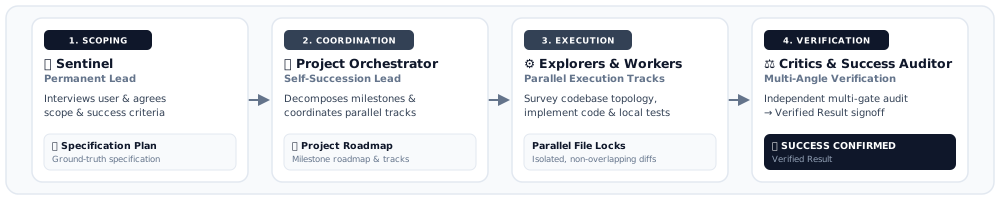
Core orchestration and execution roles
Section titled “Core orchestration and execution roles”The following roles handle task coordination, research, and implementation:
- Sentinel: The coordinator that takes over once you approve the prompt. Sentinel records your request, routes tasks, posts periodic progress updates, and spawns the Success Auditor before wrapping up.
- Project Orchestrator: A dedicated manager spawned to run the project. It breaks the approved brief into structured milestones, coordinates parallel work tracks, delegates every unit of work, and hands off to a fresh successor between milestones to prevent context degradation.
- Explorers: Read-only research agents that explore the repository, trace call chains from entry points, and evaluate candidate solutions without modifying any source files.
- Workers: Implementation agents equipped with terminal and file tools to build components, refactor code, and write unit tests in focused, non-overlapping tracks.
Adversarial verification gates
Section titled “Adversarial verification gates”To catch bugs early and ensure code actually works, candidate changes must pass independent verification checks before a milestone is approved:
- Critic: Performs independent code reviews, evaluating correctness, logical completeness, robustness, interface conformance, and adherence to project code style.
- Challenger: Actively stress-tests the code by building adversarial test suites, edge cases, failure-path probes, and worst-case inputs that stress runtime and memory.
- Auditor: Validates work against the selected integrity mode and checks test evidence against real command output, ensuring tests genuinely passed rather than being mocked or skipped.
- Success Auditor: The final reviewer spawned by Sentinel. It runs a full end-to-end verification pass and must confirm everything works before Sentinel presents the finished project to you.
Execution paths
Section titled “Execution paths”Teamwork automatically adjusts team composition, verification depth, and agent roles based on the task and your prompt:
| Execution Path | Best For | Trigger / Opt-in Signal |
|---|---|---|
| General (Distributed coding) | Multi-file SWE, large-scale refactoring, systems simulation, and research. | Default (automatically selected). |
| Iterative coding (lighter SWE tasks) | One self-contained change—a bug fix, a small feature, or a contained refactor. This path cannot decompose the task. | Explicit prompt signal (for example, “keep it small”, “keep it focused”). |
| Document Review | Multi-angle critique and synthesis of papers, RFCs, and design docs. | Review requests (for example, “review this paper”, “critique this design doc”). |
| Math / Proof | Mathematical problem solving, formal bounds, and theorem proving. | Math prompts (for example, “prove theorem X”, “verify mathematical bounds”). |
| Math / Proof (Large Team) | High-scale tournament networks for hard conjectures and combinatorial search. | Explicit scale signal (for example, “Use a very large team of agents”). |
Two-phase workflow
Section titled “Two-phase workflow”To ensure alignment before writing code and avoid constant back-and-forth interruptions, Teamwork splits every project into two clear phases.
Phase 1: prompt crafting (scoping interview)
Section titled “Phase 1: prompt crafting (scoping interview)”During Phase 1, the main Antigravity agent conducts a structured interview with you. The interview follows a simple principle—specify what, not how:
- Scope and objectives: Clarifies what you want built, its purpose (demo, production, eval, exploration), and the audience.
- Requirements: Drafts several requirement blocks covering only what you actually care about.
- Independent verification: Agrees on an objective check for each requirement—a test suite, reference benchmark or metric script, or an independent agent judging against an explicit rubric.
- Acceptance criteria: Defines clear, testable criteria for considering the project complete.
- Project working directory: Establishes a dedicated workspace folder,
defaulting to
~/teamwork_projects/{PROJECT_NAME}.
At the end of Phase 1, the main Antigravity agent creates a reviewable prompt artifact. You can review the prompt, adjust details, and approve execution with a single confirmation.
Phase 2: autonomous execution (structured handoffs)
Section titled “Phase 2: autonomous execution (structured handoffs)”Once approved, Sentinel hands off the project to the Project Orchestrator, which coordinates the team autonomously without needing step-by-step prompts.
Agents coordinate and share progress using structured artifacts in the workspace:
- Request artifact: Captures your initial prompt, goals, constraints, and testable acceptance criteria.
- Project plan artifact: Tracks the milestone roadmap, active workstreams, and dependency flow.
- Progress artifact: Records live milestone status and completed tracks.
Integrity modes
Section titled “Integrity modes”Teamwork uses three internal integrity modes to align verification depth with project requirements. During the Phase 1 interview, your agent asks which shortcuts should be off-limits and maps your answers to a mode, which is recorded in the prompt artifact:
| Mode | Purpose | Verification Behavior |
|---|---|---|
development | Rapid iteration | Lenient. Flags only fabricated outputs and facade implementations; code reuse, libraries, and pre-built frameworks are all permitted. (Default.) |
demo | Reproducible presentation | Moderate. Adds: no copying core logic from open source, no delegating core work to external tools, and no reading test source to reverse-engineer expected behavior. |
benchmark | Thorough evaluation | Maximum strictness. Fully independent, from-scratch implementation; language standard library only. |
For example, if you rule out all four shortcuts, the run uses benchmark mode,
and the Auditor enforces strict verification
rules: disallowing mocked test passes and validating ground-truth evaluations
against real system execution.
Safety, workspaces, and isolation
Section titled “Safety, workspaces, and isolation”Teamwork includes built-in safeguards to ensure parallel agent work remains safe, predictable, and easy to audit:
- Dedicated project working directories: All operations run inside dedicated
workspace folders (defaulting to
~/teamwork_projects/{PROJECT_NAME}), keeping your main repository clean and avoiding unintended side effects. - Exclusive file ownership: To prevent merge conflicts and race conditions, the Project Orchestrator assigns specific files to individual Workers. Multiple workers never edit the same file at the same time.
- Per-agent scratch directories: Each subagent has its own working directory and writes its helper scripts, notes, and logs there rather than in the project root.
- Structured state and artifact handoffs: Every state change, command run, review comment, and verification log is recorded in the project plan and progress artifacts, alongside conversation logs. You can monitor live progress across agent tracks in the UI subagent panel or CLI status bar.
- Autonomous execution with guardrails: Once you approve the initial prompt, the team works through milestones autonomously, with the Auditor and Success Auditor verifying results before final handoff.
How to use /teamwork-preview
Section titled “How to use /teamwork-preview”Select your surface to launch a Teamwork session:
Antigravity App
Section titled “Antigravity App”Start a new conversation and invoke /teamwork-preview with your goal:
/teamwork-preview Migrate our REST API service from Express to Fastify, including full test coverage, TypeScript typing, and benchmark validation.Your agent starts the Phase 1 scoping interview and generates the prompt artifact. Once you approve the prompt, the multi-agent team begins autonomous execution.
Antigravity CLI
Section titled “Antigravity CLI”In the terminal interface, run /teamwork-preview at the prompt:
/teamwork-preview Design and implement a cycle-accurate memory controller with lockstep simulation tests.You can monitor active subagents, jump directly to subagents waiting for approval using Alt+J, or inspect milestone progress in the project plan and progress artifacts in real time.
Next steps
Section titled “Next steps”Explore related documentation and guides:
- Boost deep reasoning (
/boost): Explore on-demand deep reasoning for interactive pair programming. - Subagents architecture: Learn how background subagents execute parallel workstreams.
- Slash commands overview: Explore the complete catalog of slash commands in Antigravity.
- Implementation plans (
/plan): Master reviewable planning artifacts and structured workflows. - Rules: Persist project-wide patterns and conventions.
- Antigravity overview: Explore core features and workflows in Antigravity.