

MCP Apps
Section titled “MCP Apps”MCP Apps let a Model Context Protocol (MCP) tool ship an interactive HTML interface alongside plain-text model output. Antigravity implements the open MCP Apps specification (io.modelcontextprotocol/ui) and adds Antigravity-specific entrypoints (com.google.antigravity/ui) for side panel, full-page, and custom file viewer surfaces.
For the full protocol specification, iframe bridge lifecycle, theming tokens, and SDK reference, see the MCP Apps overview and the @modelcontextprotocol/ext-apps API reference.
MCP Apps in the Antigravity App: inspect an inline deployment card in chat, open the side panel release board to promote a canary rollout, switch to the full-page view from Plugins in the sidebar, and edit a custom file type in a file viewer tab.
Where MCP Apps appear
Section titled “Where MCP Apps appear”Every MCP App comes from a plugin or MCP server that you install or build. Each tool controls where its view renders through _meta:
Inline in chat
Section titled “Inline in chat”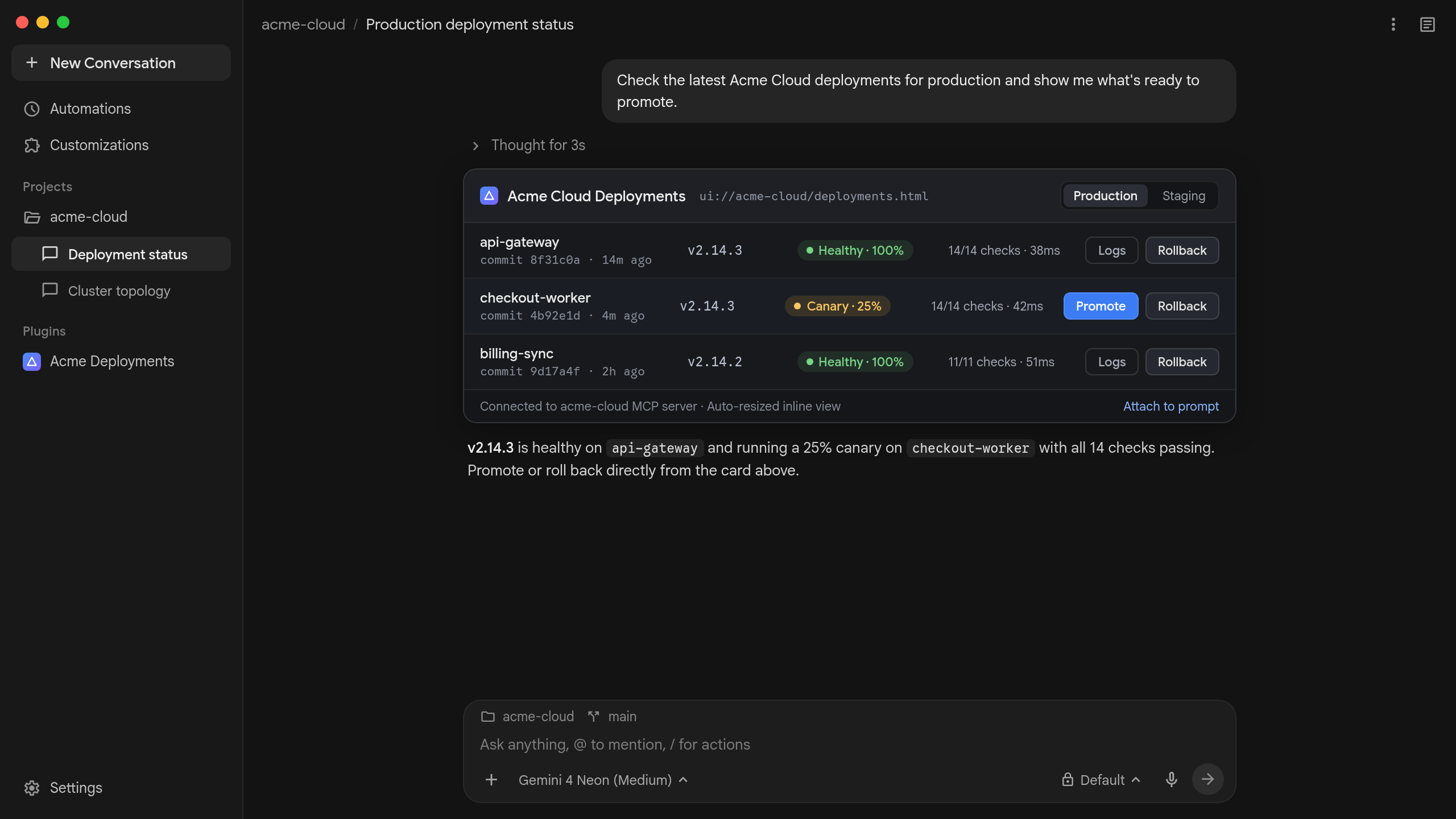
Side panel
Section titled “Side panel”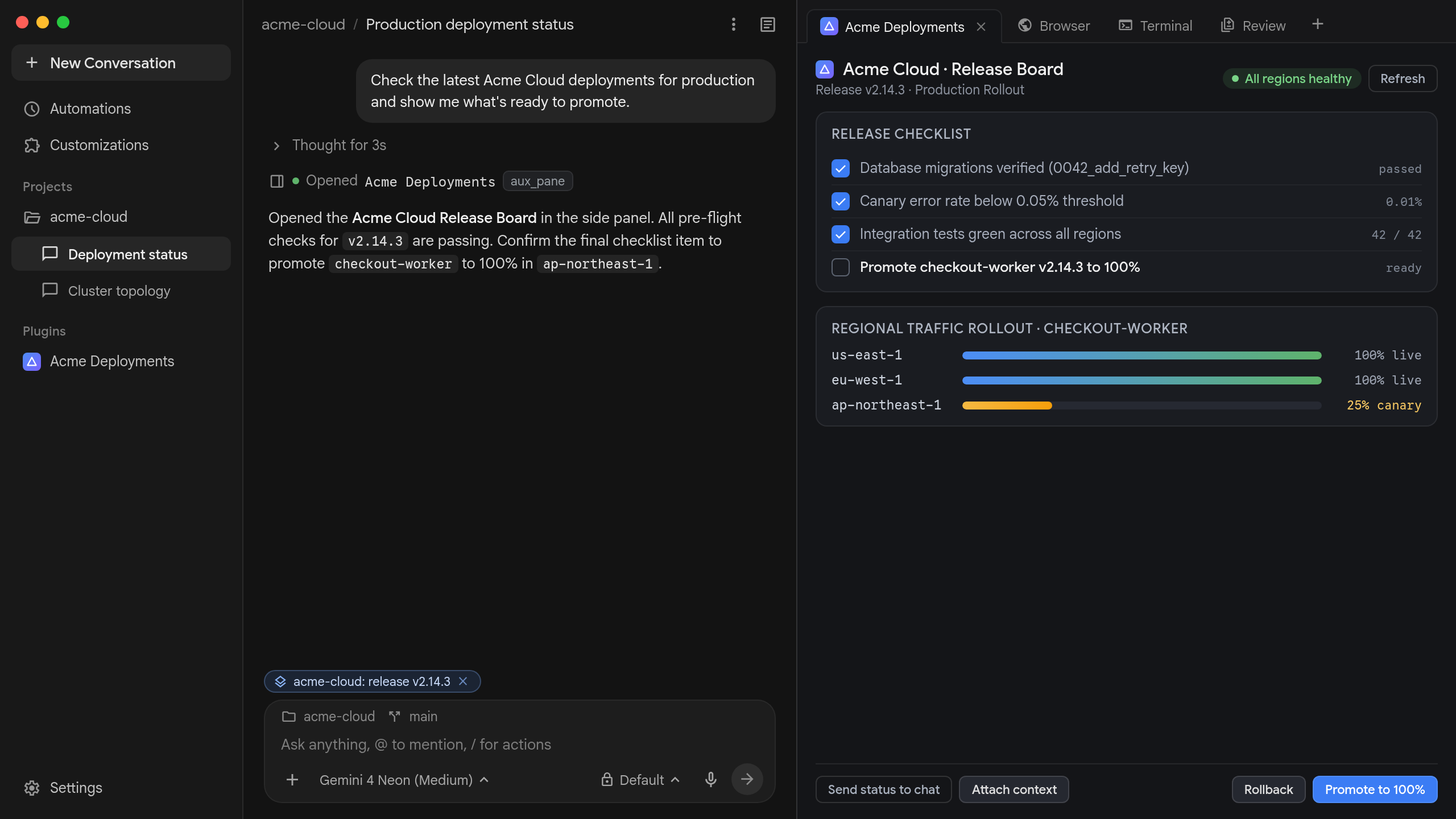
Full page
Section titled “Full page”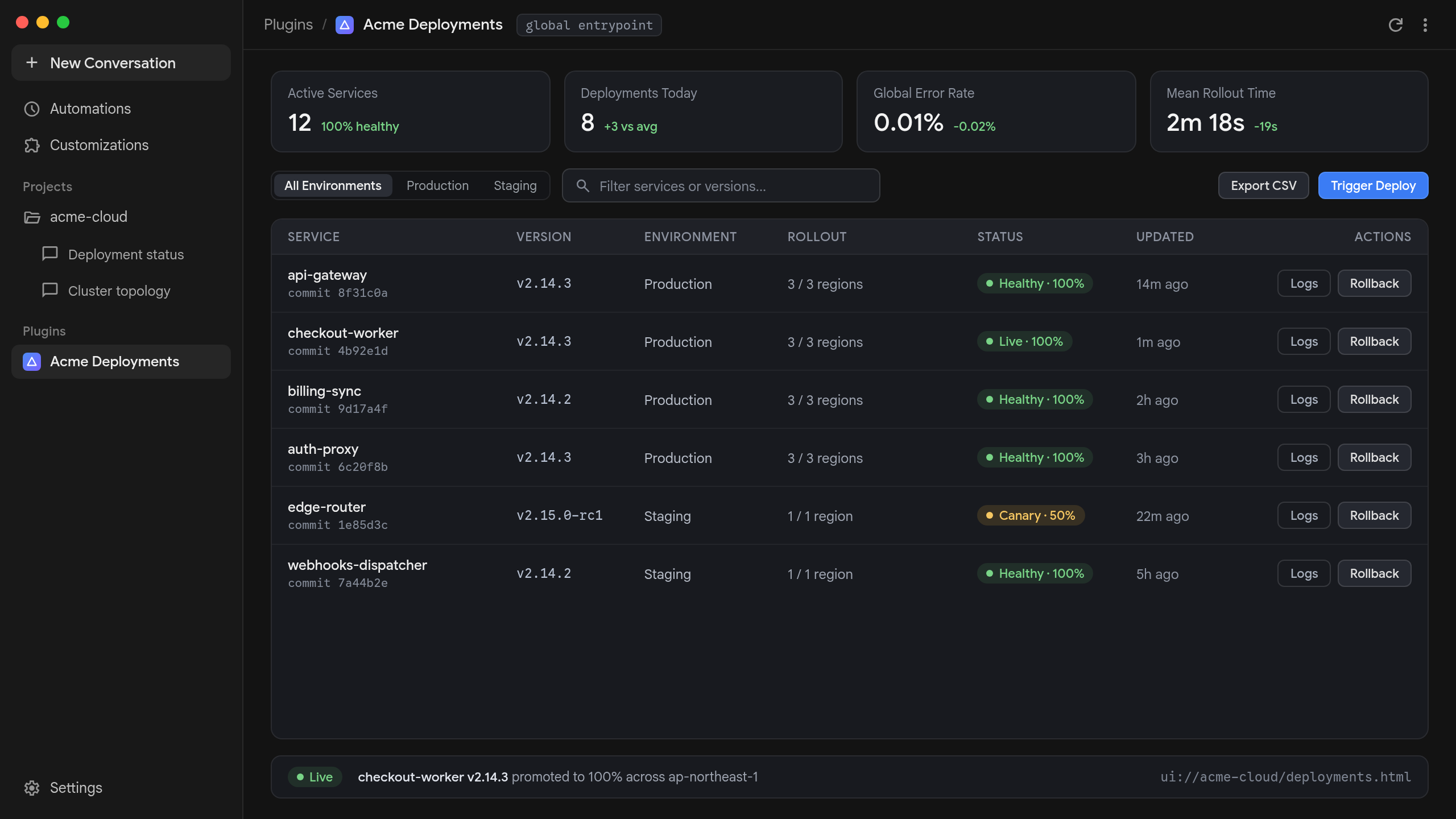
File viewer
Section titled “File viewer”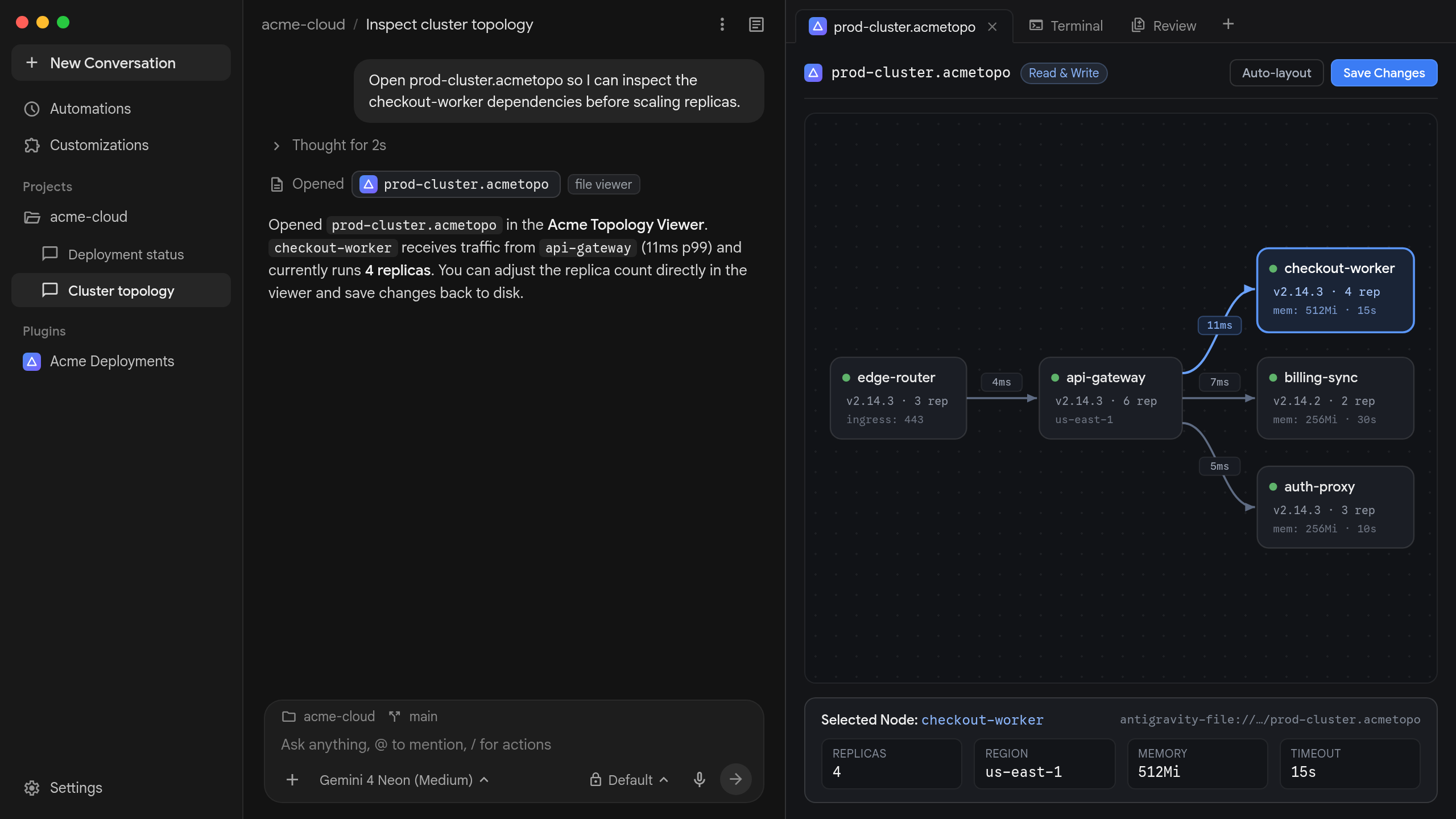
| Surface | Declared with | How it opens and behaves |
|---|---|---|
| Inline in chat | _meta.ui.resourceUri | Replaces the collapsed MCP tool step card directly in the conversation stream. Auto-resizes up to 800 px (150 px fallback). Tools with aux_pane or global entrypoints do not render inline. |
Side panelaux_pane | aux_pane entrypoint | Opens beside the conversation when the agent finishes calling the tool, from Open in side pane, or from Overview > Plugins, the side panel + menu, or More actions (⋯) > Plugins. One tab per (server, tool). Manual launches pass {}; repeat agent calls update the open tab in place. |
Full pageglobal | global entrypoint | Opens full-width outside any conversation from Plugins in the left sidebar. Manual launch passes {}. Conversation-only capabilities (message, updateModelContext) are omitted. |
File viewerfile | file entrypoint | Replaces the built-in viewer for files matching a claimed extension. Uses the plugin’s logo as the tab icon, stays hidden from the model regardless of visibility, and receives {"file": {"name", "resourceUri"}}. |
Antigravity CLIagy | mcp_config.json | Connects to <plugin>_<server> through /mcp with no iframe rendering. Ignores _meta.ui.visibility (exposing all listed tools to the model, including visibility: ["app"] helpers and file entrypoint tools) and reads plain-text content directly. |
Use MCP Apps for reusable tool or plugin UIs backed by a live MCP server, side panel views, or custom file viewers. Use /generative_ui for one-off diagrams, charts, or prototypes generated on the spot for a single conversation.
Getting started
Section titled “Getting started”The Antigravity App includes the built-in /mcp-app-development command. Ask the agent to scaffold a starter MCP App plugin directly in your workspace:
/mcp-app-development Build an MCP App plugin for Antigravity that tracks release checklist items inline in chat and in a side panel board using @modelcontextprotocol/ext-apps.To build an MCP App by hand, do the following:
- Follow the MCP Apps specification and
@modelcontextprotocol/ext-appsAPI reference to bundle a single-fileui://HTML resource (text/html;profile=mcp-app) and link it from_meta.ui.resourceUri. - Package your server inside a plugin with
mcp_config.jsonat the plugin root (using${PLUGIN_ROOT}and${PLUGIN_DATA}for localstdioservers, orserverUrlfor remote Streamable HTTP servers). - Validate and install locally with
agy plugin validate <path> --strictandagy plugin install <path>.
Antigravity extensions
Section titled “Antigravity extensions”During MCP initialize, the Antigravity App advertises com.google.antigravity/ui ({"entrypoints": ["aux_pane", "global", "file"]}) alongside io.modelcontextprotocol/ui.
Entrypoints
Section titled “Entrypoints”Add _meta["com.google.antigravity/ui"].entrypoints on a tool that also declares a valid ui:// resourceUri to open views outside the inline conversation stream. Keep file entrypoints on their own separate tool: any tool with a file entrypoint is unconditionally hidden from the model and receives {"file": {"name", "resourceUri"}} rather than {}:
// Tool 1: model-callable side panel + full-page view
{
  "_meta": {
    "ui": { "resourceUri": "ui://acme-cloud/deployments.html" },
    "com.google.antigravity/ui": {
      "entrypoints": [
        { "type": "aux_pane", "title": "Acme Deployments" },
        { "type": "global", "title": "Acme Deployments" }
      ]
    }
  }
}

// Tool 2: separate host-invoked custom file viewer
{
  "_meta": {
    "ui": { "resourceUri": "ui://acme-cloud/topology-viewer.html" },
    "com.google.antigravity/ui": {
      "entrypoints": [
        { "type": "file", "title": "Acme Topology Viewer", "extensions": [".acmetopo", ".jsonc"] }
      ]
    }
  }
}| Type | Extra fields | Host behavior |
|---|---|---|
aux_pane | title (optional string) | Auto-opens beside the active conversation when called by the agent; manual menu launches pass {}. Does not render inline. One tab per (server, tool). |
global | title (optional string) | Opens full-width from Plugins in the left sidebar with {}. Does not render inline. |
file | title (optional string)extensions (required string[]) | Always hidden from the model regardless of visibility. Extensions are normalized to lowercase with a leading dot. First enabled server claiming an extension wins. |
Custom file viewers and editors
Section titled “Custom file viewers and editors”When a user opens a file matching a file entrypoint extension, Antigravity invokes the tool with a per-view opaque URI ({"file": {"name": "bracket.stl", "resourceUri": "antigravity-file://<uuid>/bracket.stl"}}) without exposing the raw filesystem path:
- Read: Send
resources/readfor that exactresourceUrifrom the iframe. Antigravity answers directly (without calling your MCP server) with a base64blob(application/octet-stream, max 10 MiB). - Write (local files only): Check
hostContext["com.google.antigravity/resources"]?.writebefore enabling save controls. When present, sendcom.google.antigravity/resources/writewith{ uri, text }(UTF-8) or{ uri, blob }(base64), capped at 10 MiB.
Additional host actions
Section titled “Additional host actions”- Open a file in the side panel: Call
app.request()with methodcom.google.antigravity/toggle-aux-paneand params{ "tabType": "fileView", "uri": "file:///path/to/file" }. Handle JSON-RPC-32601on hosts without this extension. - Start a background conversation: Pass
_meta: { "com.google.antigravity/message": { "target": "new" } }inui/message(app.sendMessage()) to start a new conversation in the same project instead of posting to the current thread.
Antigravity host limits and notes
Section titled “Antigravity host limits and notes”| Limit | Value | Notes |
|---|---|---|
| HTML and file size | 10 MiB | Applies to ui:// HTML documents and antigravity-file:// reads and writes. |
| Persisted tool result | 1 MiB | CallToolResult payloads stored on trajectory steps; load larger datasets through an app-only tool. |
Concurrent tools/call | 4 per view | Scoped strictly to the view’s owning MCP server; in-flight calls abort on close. |
| Hidden background frames | 5 (LRU) | Hidden aux_pane and global frames stay mounted in memory up to the 5-frame cap. |
| Inline card height | 150 px fallback800 px max | Falls back to 150 px if no size-changed arrives within 100 ms; taller views scroll internally. |
| Teardown | No notification | Antigravity does not send ui/resource-teardown on close; persist edits eagerly. |
| Isolation and CSP | Default-deny | Isolated iframe with no persistent browser storage. Allowlist bare origins only in resource _meta.ui.csp, and prefer tools/call over connectDomains. |
Iterating on local plugins
Section titled “Iterating on local plugins”Antigravity namespaces plugin servers as <plugin-name>_<server-key> and falls back to its bundled Node.js runtime only when "command": "node". Because ui:// resources fetch fresh on every mount, HTML edits apply when you close and reopen a view. After editing local stdio server code, restart the server from Customizations > Installed > select plugin > MCP > More actions (⋮) > Restart.
Next steps
Section titled “Next steps”- MCP Apps overview: Concepts, architecture, and host guides on
modelcontextprotocol.io. - MCP Apps specification: Full
io.modelcontextprotocol/uiprotocol specification. @modelcontextprotocol/ext-appsAPI reference: Client and server SDK documentation.- Model Context Protocol (MCP): Connect and configure local
stdioand remote Streamable HTTP MCP servers in Antigravity. - Build plugins: Package
plugin.json,mcp_config.json, and skills, and publish to the Marketplace. - Side panel and Overview panel: Work with side panel tabs and Plugins menus.
- Generative UI (
/generative_ui): Build one-off interactive HTML artifacts without an MCP server.