Chrome DevTools
GoogleReliable automation, in-depth debugging, and performance analysis in Chrome using Chrome DevTools and Puppeteer
The Marketplace lets you discover, install, and manage curated Google and partner plugins that extend your agent with reusable skills, MCP servers, rules, lifecycle hooks, and subagents. Jump straight to the plugin catalog below to open any plugin directly in the Antigravity App or copy its CLI install command.
Open Customizations > Marketplace directly in the Antigravity App, or follow the steps below:
To browse and install Marketplace plugins manually in the Antigravity App:
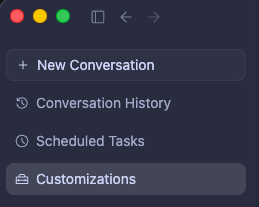
In the left sidebar, click the Customizations tab (below Automations):
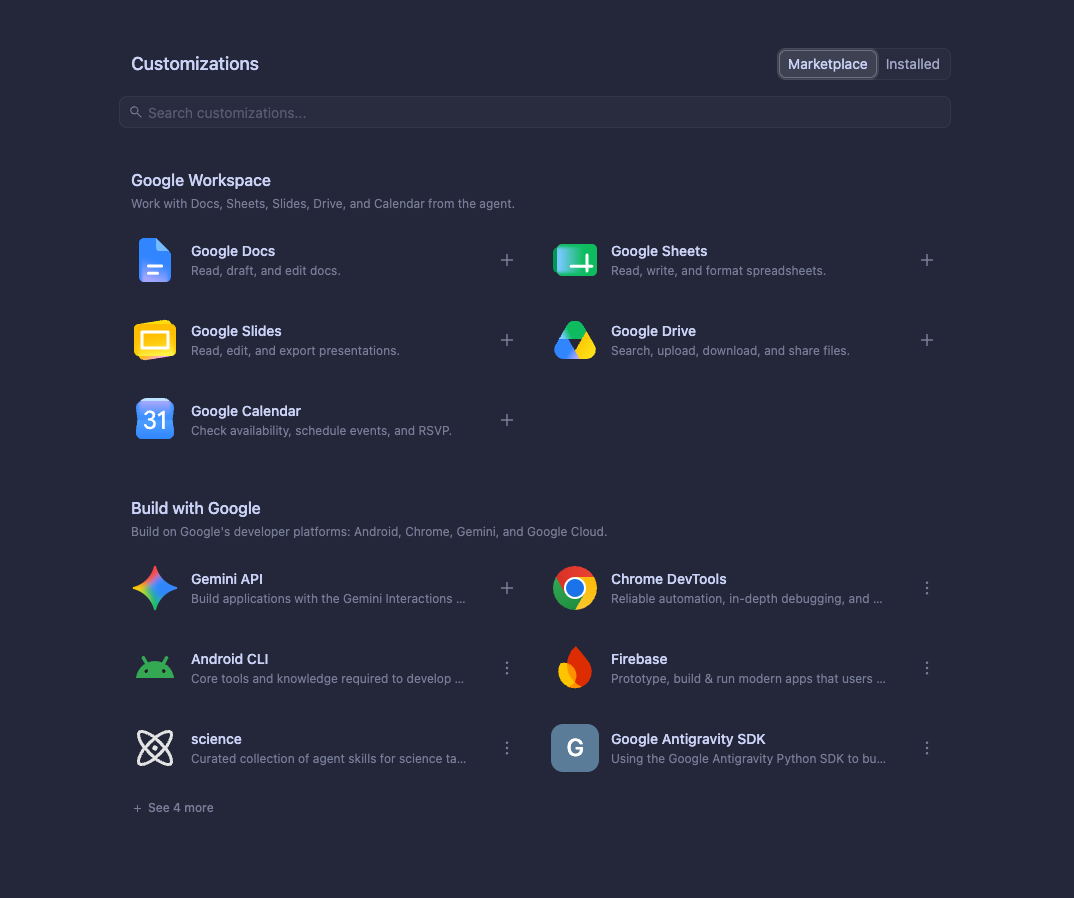
Click the Marketplace tab to view available plugins:
Click any plugin card to inspect its details and bundled capabilities:
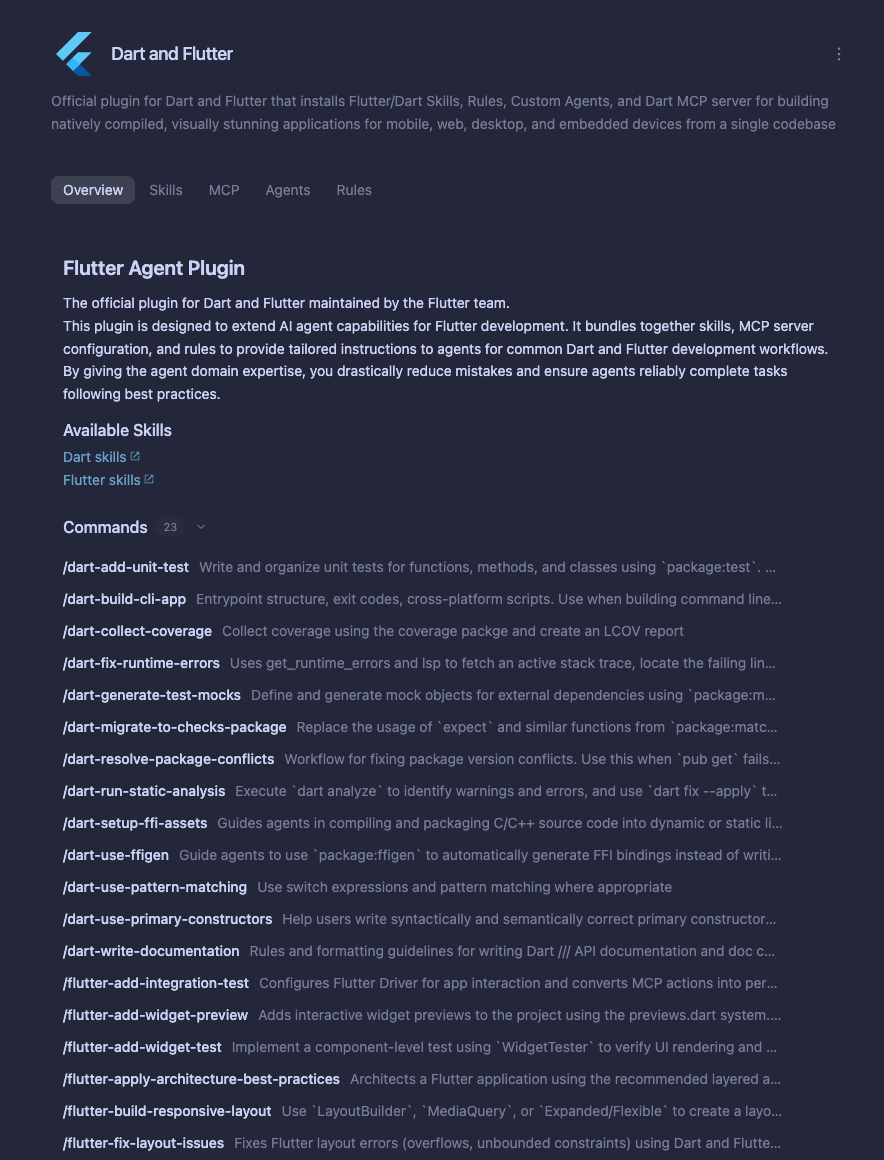
Click Add to install the plugin. You can also click + next to a plugin in the Marketplace list to install it without opening its details.
Some plugins connect to external services that require authentication before their MCP tools can run:
To inspect, toggle, or uninstall existing plugins:
In the Customizations panel, click the Installed tab:
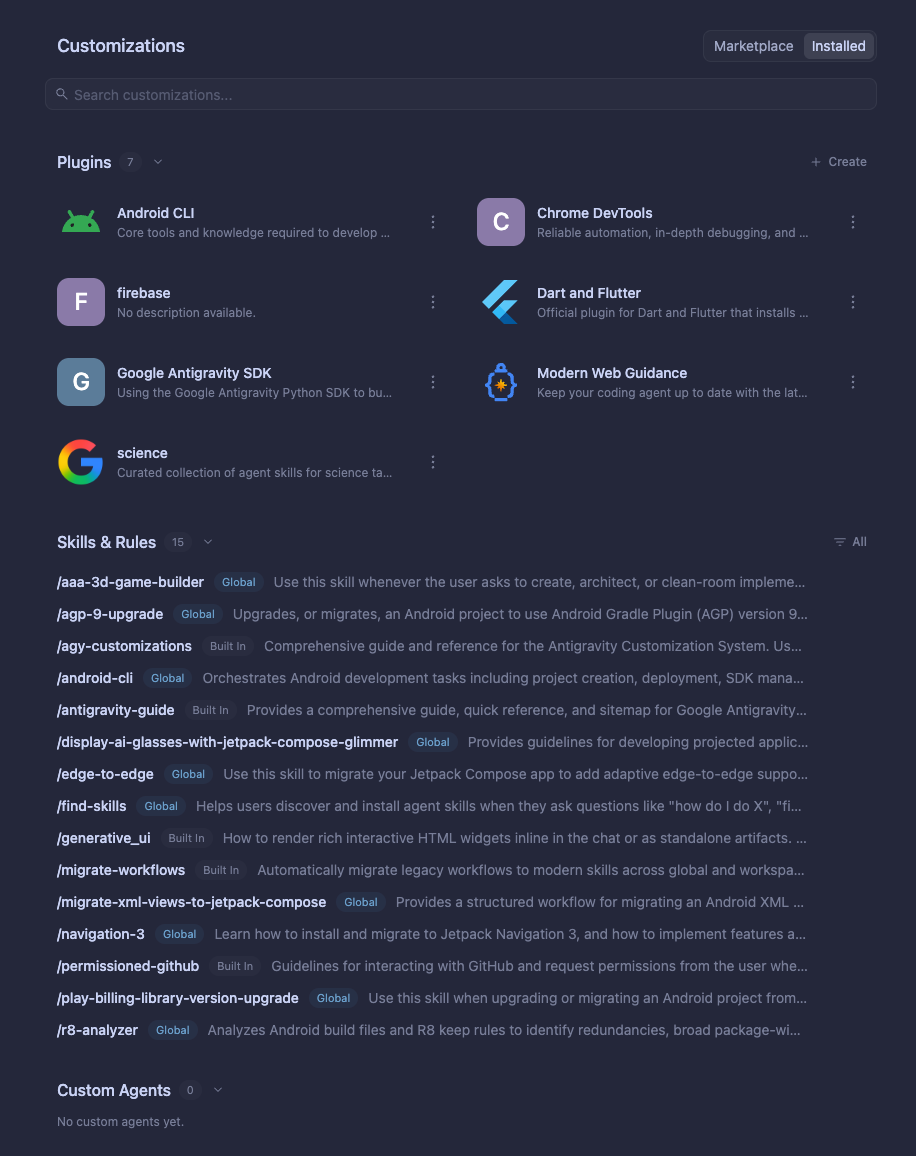
Click the ⋮ menu beside any installed plugin (or open the plugin card) to enable, disable, or configure it.
Select Uninstall from the ⋮ menu (or on the plugin detail page) to remove a plugin.
Any plugins you install in the Antigravity App automatically sync and appear in the Antigravity CLI’s Installed tab.
The Antigravity App handles antigravity:// Marketplace links so you can open the
catalog or a specific plugin’s detail page in a single click when signed in:
antigravity://customizations/marketplacesantigravity://plugin/<plugin-name> (or antigravity://customizations/marketplaces/antigravity-plugins-official/plugins/<plugin-name>)antigravity://customizations/marketplaces/antigravity-plugins-partners/plugins/<plugin-name> (or antigravity://plugin/<plugin-name>?marketplace=antigravity-plugins-partners)If a link names a plugin ID that isn’t found in the catalog, the Antigravity App opens the Marketplace browse tab instead. If you publish plugins and want to embed an Open in Antigravity link in your documentation or README, see Share deep links to your plugin.
In the Antigravity CLI, open the interactive plugin manager using the /plugin
slash command (or its alias /plugins):
/pluginInteractive CLI Plugins Manager — press Tab (or click a tab) to switch between Installed and Discover, ↑/↓ to navigate, Enter to expand details, Space to toggle enable/disable, and Ctrl+S to install or uninstall.
Press Tab to switch between the Installed tab and the Discover tab.
Use the Discover tab to browse the Marketplace catalog and install new plugins:
The following example shows the Discover tab with the details of a selected plugin expanded:
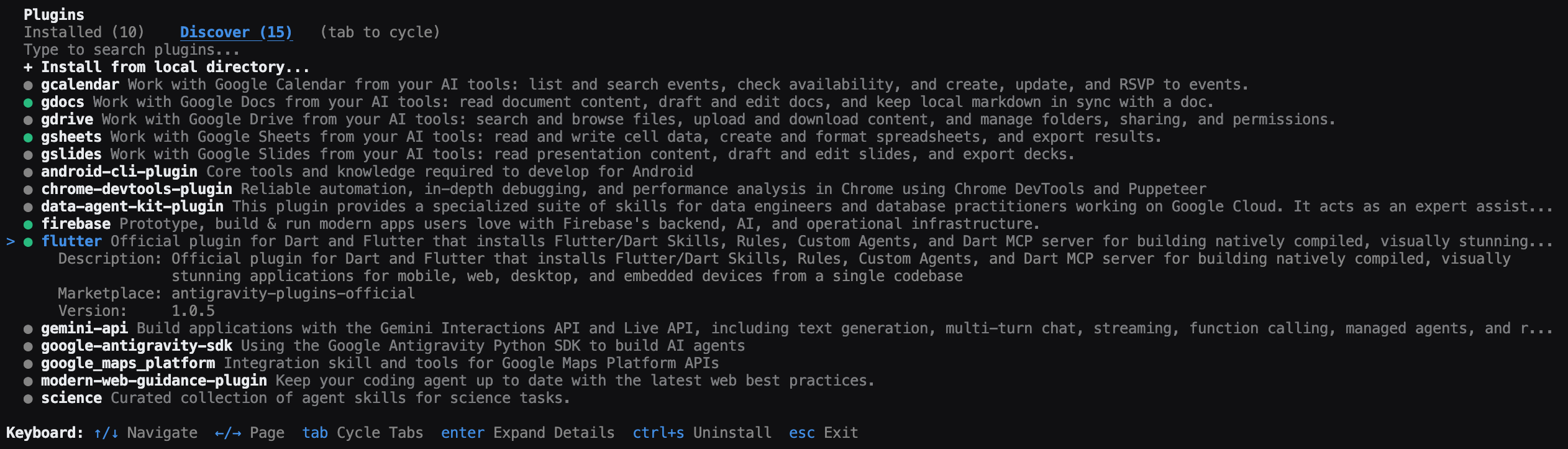
Once a plugin is installed, the interface updates as follows:
●) appears beside the plugin name indicating
its installed status.Use the Installed tab to inspect and manage the plugins you have installed:
variables), pressing Space opens an interactive
prompt to fill in those values before enabling the plugin.The following keyboard shortcuts are available in the plugin manager:
| Key | Tab | Action |
|---|---|---|
| Tab | Both | Switch between the Installed tab and Discover tab. |
| Any key | Both | Search and filter plugins in the active tab. |
| Enter | Both | Expand plugin details (or select Install from local directory in Discover). |
| Ctrl + S | Both | Install an uninstalled plugin, or uninstall an installed plugin. |
| Space | Installed | Toggle enable or disable on an installed plugin. |
/plugin commandsIn addition to the interactive panel, /plugin supports inline commands to
install, uninstall, enable, disable, and list plugins directly from
the prompt without opening the plugin manager UI:
Install from a Marketplace catalog or local directory: Specify
<plugin-name>@<marketplace-name> using antigravity-plugins-official for
Google plugins or antigravity-plugins-partners for partner plugins, or pass a
local path:
/plugin install firebase@antigravity-plugins-official
/plugin install stripe@antigravity-plugins-partners
/plugin install <local-path>
For example, running /plugin install firebase@antigravity-plugins-official
outputs:
Successfully installed plugin "firebase" from "antigravity-plugins-official".Manage and list plugins inline: Run the following commands:
/plugin uninstall <plugin-name>
/plugin enable <plugin-name>
/plugin disable <plugin-name>
/plugin listagy plugin)Outside an interactive TUI session, you can install and manage plugins directly
from your shell using agy plugin:
agy, install Google
plugins from antigravity-plugins-official (or pass a bare <plugin-name>,
which defaults to antigravity-plugins-official) and partner plugins from
antigravity-plugins-partners:
# Google plugins (bare name defaults to antigravity-plugins-official)
agy plugin install firebase
agy plugin install firebase@antigravity-plugins-official

# Partner plugins
agy plugin install stripe@antigravity-plugins-partnersagy plugin install firebase outputs:
Installed plugin "firebase" from antigravity-plugins-officialagy plugin install https://github.com/<owner>/<repo>agy plugin install </path/to/local/plugin>agy plugin list for a human-readable summary
of installed plugins and their component counts, or pass --json to output a
JSON array with installation paths and component names:
agy plugin list
agy plugin list --jsonagy plugin enable <plugin-name>
agy plugin disable <plugin-name>
agy plugin uninstall <plugin-name>Filter curated Google (antigravity-plugins-official) and partner
(antigravity-plugins-partners) plugins by publisher, shelf, or keyword. Click
Open in Antigravity on any card to open its detail page in the Antigravity
App (if the app isn’t installed yet, the button offers a direct download link),
or click Copy CLI to copy its agy plugin install command.
Reliable automation, in-depth debugging, and performance analysis in Chrome using Chrome DevTools and Puppeteer
Official plugin for Dart and Flutter that installs Flutter/Dart Skills, Rules, Custom Agents, and Dart MCP server for building natively compiled, visually stunning applications for mobile, web, des…
Prototype, build & run modern apps that users love with Firebase's backend, AI, and operational infrastructure.
Build applications and shell workflows with the Gemini Interactions API, Decisions API, Live API, Genie 4 interactive worlds, and Gemini API CLI, including text, image, video, speech, and music gen…
Read, draft, and edit docs.
Antigravity for science highlights, and an overview of the main science plugins.
Use Datadog directly in Antigravity through a preconfigured Datadog MCP server. Query logs, metrics, traces, dashboards, and more through natural conversation. This plugin is in preview.
Turn Figma designs into production code, map components with Code Connect, and create or edit Figma files in Antigravity.
The product development system for teams and agents. Manage issues, projects, and documents across your Linear workspace from Antigravity.
Connect Antigravity to your Notion workspace with the Notion MCP server, plus skills for research, documentation, meeting prep, specs, trackers, and project updates.
Accept payments and grow your business.
Build and deploy web apps and AI agents on Vercel with skills for Next.js, AI SDK, and cloud services, plus the official Vercel MCP server.
Core tools and knowledge required to develop for Android.
RDKit cheminformatics, reaction and property tools, plus ChEMBL and PubChem, to work with molecules, their properties, and bioactivity data.
This plugin provides a specialized suite of skills for data engineers and database practitioners working on Google Cloud.
Develop ideas with context and review documents with fresh eyes.
AlphaGenome and major genetics databases to analyze DNA variants, gene regulation, and links between genes and disease.
Search, read, draft, and send emails in Gmail.
Using the Google Antigravity Python SDK to build AI agents
Check availability, schedule events, and RSVP.
Google Cloud guidance for coding agents: first-project onboarding, authentication and credential selection, and safety-critical validation for gcloud CLI commands.
Search and retrieve official documentation across Google Cloud, Gemini, Android, Firebase, Flutter, and Web. Requires Google Cloud credentials (ADC) or an API key.
Search, upload, download, and share files.
Search and retrieve official Google Health API documentation on developers.google.com/health through the Google Health Developer MCP server.
Search official Google Home, Matter, and OpenThread documentation and query Cloud-to-cloud user feedback integration diagnostics through the Google Home Developer MCP server.
Integration skill and tools for Google Maps Platform APIs
Read, write, and format spreadsheets.
Read, edit, and export presentations.
Connect to your managed Looker MCP server to explore data, run saved Looks, build dashboards, and validate LookML.
Keep your coding agent up to date with the latest web best practices.
Robotics skills for any robot: 3D perception, collision-free motion planning, visual servoing, robot bring-up, sim2real, agent iteration, MuJoCo simulation, SimReady 3D asset authoring and physics…
Search scientific papers, clinical trials, FDA records, and historical texts.
AlphaFold, 3D visualization tools, and protein databases to explore protein structures, sequences, pathways, and drug interactions.
Query Arize AX projects, traces, datasets, and experiments from Antigravity, with skills for tracing, evals, and prompt optimization.
Teamwork Graph CLI is Atlassian's agent-first interface to your entire work context: Jira issues, Confluence pages, Bitbucket PRs, along with your connected third-party data sources.
Add Auth0 authentication to any app: login, MFA, SSO, Organizations, RBAC, custom domains, and branding. Debug auth errors and migrate from other providers.
Build and deploy Base44 full-stack apps: CLI project management, JavaScript/TypeScript SDK development, and production troubleshooting skills.
Investigate incidents, check who's on call, and query logs, metrics, traces, errors and RUM in Better Stack. Build dashboards and manage uptime monitors.
Manage your Bigin CRM from Antigravity: review pipelines, find contacts and deals, log calls, plan follow-ups, and email customers.
Give your agent a real browser: navigate, click, type, screenshot, and extract data from any site, locally or on Browserbase cloud browsers.
Create, edit, review, resize, and brand-check Canva designs with the Canva MCP server.
Add authentication and user management with Clerk. Skills for setup, frameworks, organizations, billing, webhooks, and testing, plus the Clerk MCP server.
Connect Antigravity to your ClickUp workspace — manage tasks, track time, and collaborate with your team without switching context.
Build, deploy and manage apps on Cloudflare Workers, storage and AI, with platform skills and the Cloudflare API through one MCP server.
CodeRabbit is the governance and control layer for agentic software development helping developers trust AI written code.
Up-to-date documentation lookup. Pull version-specific documentation and code examples directly from source repositories into your coding agent's context.
Use the official CrowdStrike-hosted MCP server to work across Falcon: detections, cases, threat intel, SIEM, hosts, vulnerabilities, cloud, and more.
Databricks skills for the CLI, Apps, Lakebase, Model Serving, Lakeflow Jobs, Spark Declarative Pipelines, Declarative Automation Bundles (DABs), and classic-to-serverless migration.
Research U.S. case law, statutes, regulations, and court rules. Find authorities, check quotations against opinions, and see how later courts cite a case.
Build, test, and debug Docusign integrations with developer skills for authentication, template-based signing, envelope status, and troubleshooting.
Connect Antigravity to Dropbox to search, inspect, summarize, share, collect uploads, organize folders, and clean up files with confirmation for write actions.
Investigate production issues with real Dynatrace data: problems and root causes, logs, metrics, traces, and vulnerabilities, via skills and the MCP server.
Packaged workflows for SCA remediation, AI SAST triage, CI/CD posture, malware response, findings review, Endor Labs setup, and more.
Triage Exabeam New-Scale alerts and cases end to end: gather the evidence, map MITRE, reach a verdict, and record it behind an approval step.
Query Grafana Cloud metrics, logs, traces and profiles, manage dashboards, alerts and incidents, and ask Grafana Assistant through the hosted MCP server.
The AI notepad for meetings. Connect to your meeting history and use your conversation context to get things done.
Build and debug pipelines, manage deployments, investigate security findings, and operate Harness with connected tools and reusable workflow skills.
Respond to and investigate incidents, manage on-call schedules and escalations, and write runbooks and skills. Bundles the official incident.io MCP server.
Search Intercom conversations, contacts, and companies, spot support trends, and install the Intercom Messenger with secure identity verification.
Connect your agent to invideo's AI-native video editor. It trims, grades and mixes on a real timeline while you watch every change land.
Search the web and read any page as clean markdown with Keenable, a search engine built for AI agents. Keyless: no signup or API key needed.
Ask a question of the live web and get a table back. Keenable SELECT runs many searches, reads the pages and extracts the fields you need in one call. Sign in with a Keenable account.
Generate images and V4 videos with Kling AI. Supports multimodal references, reusable subjects, motion control, and task tracking through secure OAuth.
Create, run and debug Leapwork Play tests and runlists, build agents, and hand work to Play's AI workflows, right from Antigravity.
Salaries, jobs & career advice. Levels.fyi is your career companion to ensure you get paid fairly and find jobs you'll love.
Research US case law, statutes, and regulations, plus live dockets from federal and state courts. A Midpage account is required.
Give your AI agent 600,000+ real app screens, and the skills to use them.
Plan and track work in monday.com from Antigravity: create, update and assign items, write docs, and build forms that turn requests into items.
Official Antigravity plugin for MongoDB Atlas (hosted MCP Server + Skills).
Build, test, and manage n8n workflows and Agents through your instance MCP server. Use official skills for node setup, credentials, and debugging.
Agent skills for Neo4j graph database — write Cypher queries, design graph models, use drivers, run imports, build GraphRAG pipelines, run GDS algorithms, and manage Aura instances.
Build and deploy on Netlify: functions, edge functions, blobs, database, identity, forms, image CDN, caching, and AI Gateway, plus the Netlify MCP server.
Create and send proposals, quotes, and contracts for e-signature. Track signing progress and identify documents that need follow-up.
Search the live web and fetch page content with Parallel's hosted MCP server. Free access with no Parallel account, API key, or Parallel CLI required.
Agent plugin for PingOne multi-tenant. Includes skills and a remote MCP server that lets AI agents configure and monitor your PingOne environments.
Equip Antigravity with specialized Postman skills for the complete API lifecycle. Discover, design, test, document, mock, monitor, and improve APIs through agent-friendly, filesystem-first workflows.
Set up Qodo, explore code and repository history, review local changes, and resolve pull-request findings directly from Antigravity.
Deploy, configure, monitor, and troubleshoot apps, databases, and infrastructure on Railway from Antigravity with Railway's agent skill and hosted MCP server.
Skills for integrating the Scandit Data Capture SDK: product selection, docs and implementation guides for barcode scanning, ID capture and smart label capture.
SEO workflows on live Semrush data: keyword research, site audits, backlinks, competitor, traffic and market analytics, PPC, and AI brand visibility.
Query your SentinelOne Singularity Console from Antigravity through a self-hosted, read-only Purple AI MCP server. Requires an active console deployment, your console URL, and an API token.
Set up Sentry monitoring, investigate production errors, and configure alerts and releases with expert skills and live context from your Sentry projects.
SonarQube is the AI code quality and security verification platform used by millions of developers to catch bugs, vulnerabilities, and leaked secrets.
Turn an idea into a website, dashboard, report, or small web tool you can share. Build it in chat or bring your own work, and publish it with Spacefast.
Official Supabase plugin for Antigravity with Supabase skills and MCP access for project management, database work, auth, storage, and Postgres best practices.
Make your coding agent a better engineer
Web search, content extraction, website crawling, URL discovery, and deep research for Antigravity via Tavily's hosted MCP server and skills.
Run, debug and triage tests on the TestMu AI cloud, plus Kane CLI for browser and mobile test automation and Rook CLI for testing AI agents.
Official Trello plugin with the Trello MCP server and a skill for boards, lists, cards, checklists, Inbox, and Planner.
Unity's official plugin for Antigravity, with curated skills for game development, monetization, and performance optimization.
Investigate files, URLs, domains and IP addresses with VirusTotal threat intelligence, analysis and submission recovery.
Search and read your Wispr Flow meeting notes, transcripts, scratchpad notes, and calendar events. Read-only access to your own account.
Build Wix apps and headless sites, and manage Wix stores, bookings, CMS and more, with Wix CLI skills and the official Wix MCP server.
Build, publish, and manage WordPress.com and Jetpack-connected sites. Draft posts, edit blocks, check traffic stats, moderate comments, and manage plugins.
Automate workflows across 10,000+ apps. Run one-off actions or build automations for YouTube, Instagram, Gmail, Facebook Pages, LinkedIn, Slack, Pinterest.
Run Zoho Books from Antigravity: invoicing, bills, banking, journals, projects, items, taxes, customization and automation.
Build on Zoho CRM v8: REST API, Deluge functions, ClientScript, widgets, COQL and connections, with live CRM data through your Zoho MCP server.
Zoho Desk plugin for Antigravity.
Connect Zoho Projects to Antigravity to turn tasks and issues into working code. Access project context, investigate bugs, and update work items as you develop.
No plugins match your current filter. Clear your search or switch back to all shelves.
Once a plugin is installed and enabled, its bundled capabilities are available in your workspace automatically:
| Component | How to use it in your workflow |
|---|---|
| Starter prompts | In the Antigravity App (Customizations > Installed), open a plugin’s detail view and click any suggested prompt chip to start a guided task immediately. |
| Skills | Ask for a task in natural language—Antigravity loads relevant plugin skills on demand using progressive disclosure—or invoke a skill explicitly in chat with /<skill-name>. |
| MCP servers | Ask the agent to query or act on the connected service (such as Jira, Figma, Datadog, Stripe, or Firebase). Bundled MCP tools (namespaced as <plugin-name>_<server-name>) are available automatically while the plugin is enabled. |
| Custom agents & subagents | The main agent delegates specialized tasks (such as security reviews or accessibility audits) to bundled subagents automatically. You can also run a plugin’s custom agent directly as your primary session agent via the agent selector in the App, /agents in the CLI, or agy --agent <agent-name> from your terminal (run agy agents to list all available agents). |
| Rules & Hooks | Run automatically in the background while the plugin is enabled—enforcing coding conventions, SDK standards, and pre- or post-tool policy checks without manual invocation. |
Explore related documentation and guides:
plugin.json manifests,
bundle skills, MCP servers, custom agents, rules, and hooks, and validate your
plugin locally with agy plugin validate.