

Plugins
Section titled “Plugins”Plugins package reusable skills, Model Context Protocol (MCP) servers, custom agents and subagents, rules, and lifecycle hooks into a single versioned unit. You can install curated plugins from the Antigravity Marketplace, install plugins from a GitHub repository or local directory, or build and publish your own plugins.
| Goal | Guide |
|---|---|
| Browse the Marketplace catalog | Marketplace — discover, install, and configure Google and partner plugins in the App and CLI. |
| Use and manage installed plugins | This page — learn what plugins bundle, how to use installed plugins, and how to manage plugins by surface. |
| Build, validate, and publish a plugin | Build plugins — follow the 3-step quickstart, plugin.json manifest schema, component authoring guides, agy plugin validate --strict, and Marketplace submission. |
What a plugin bundles
Section titled “What a plugin bundles”A single plugin can bundle any combination of five customization components:
| Component | How it extends Antigravity |
|---|---|
| Skills | Task-specific workflows, helper scripts, and reference docs loaded on demand or invoked explicitly via /<skill-name>. |
| MCP servers | Remote HTTPS or local stdio Model Context Protocol tool servers (<plugin-name>_<server-name>), including OAuth sign-in and user-prompted API key variables. |
| Custom agents & subagents | Specialized agents with dedicated system prompts, model tiers, and tool allowlists that can run as background subagents or as your primary session agent. |
| Rules | Persistent coding conventions, architectural constraints, or file-glob-scoped instructions. |
| Lifecycle hooks | Synchronous shell commands or prompt evaluations that inspect, block, or augment agent lifecycle events and tool calls. |
Using installed plugins
Section titled “Using installed plugins”Once a plugin is installed and enabled, its bundled components are available across your workspace sessions automatically:
Starter prompts and skills
Section titled “Starter prompts and skills”-
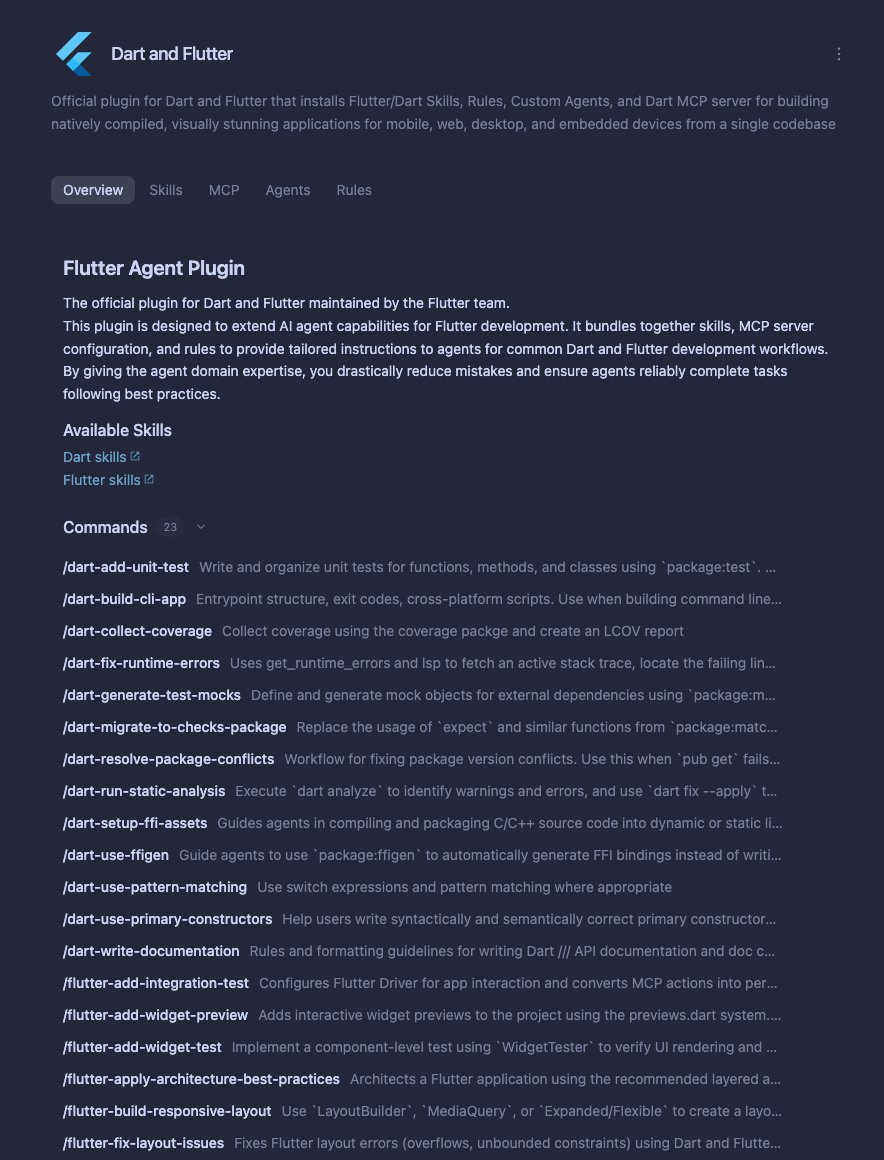
Starter prompt chips: In the Antigravity App (Customizations > Marketplace or Customizations > Installed), open a plugin’s detail page and click any suggested prompt chip at the top of the page to start a guided task immediately:
-
Automatic skill loading: Describe your task in natural language. At session startup, Antigravity loads only the
nameanddescriptionof each enabled plugin skill and reads the fullSKILL.mdinstructions on demand when your prompt matches. -
Slash command invocation: Type
/<skill-name>in chat (for example,/dart-add-unit-testor/hello) to trigger a plugin skill explicitly.
MCP tools and credential setup
Section titled “MCP tools and credential setup”- Calling MCP tools: Ask the agent to query or act on the connected service
(such as Firebase, Dart and Flutter, Stripe, Datadog, Figma, or Jira). Bundled
MCP tools are namespaced as
<plugin-name>_<server-name>. - API keys and configuration variables: If a plugin declares required
configuration variables (such as an API token or project URL), installing the
plugin via the CLI leaves it disabled until configured. Toggling the plugin on
in Customizations > Installed (or pressing Space on the plugin
in the CLI’s
/pluginInstalled tab) opens a setup dialog prompting for each variable. - OAuth sign-in: If a plugin uses OAuth 2.0 without required configuration variables, it installs in an enabled state and prompts you in the browser to complete sign-in when its MCP server connects.
Custom agents and subagents
Section titled “Custom agents and subagents”- Automatic background delegation: When
subagent: true(the default), the primary agent automatically delegates specialized tasks—such as security reviews, accessibility audits, or framework migrations—to the plugin’s bundled subagents in the background. - Running a plugin agent directly: When
mainAgent: true(the default), you can select the plugin’s custom agent as your primary session agent:- Antigravity App: Choose the agent from the agent selector in the conversation view or under Customizations > Installed > Custom Agents.
- Antigravity CLI (interactive): Run
/agentsto inspect and switch agents. - Antigravity CLI (shell): List all available agents (including plugin
agents) and launch a session with a specific agent:
# List built-in, workspace, and plugin agents
agy agents

# Start an interactive or headless session with a plugin agent
agy --agent <agent-name>
Rules and lifecycle hooks
Section titled “Rules and lifecycle hooks”- Rules: Always-on plugin rules and glob- or model-triggered rules apply automatically whenever the plugin is enabled.
- Lifecycle hooks: Bundled
PreToolUse,PostToolUse,SessionStart, andStophooks run automatically in the background while the plugin is enabled.
Managing plugins by surface
Section titled “Managing plugins by surface”Follow the instructions below to install, configure, enable, disable, or uninstall plugins on your preferred surface:
Antigravity App
Section titled “Antigravity App”Browse and manage plugins in the App
Section titled “Browse and manage plugins in the App”-
Open the Customizations tab, located below Automations in the left sidebar.
-
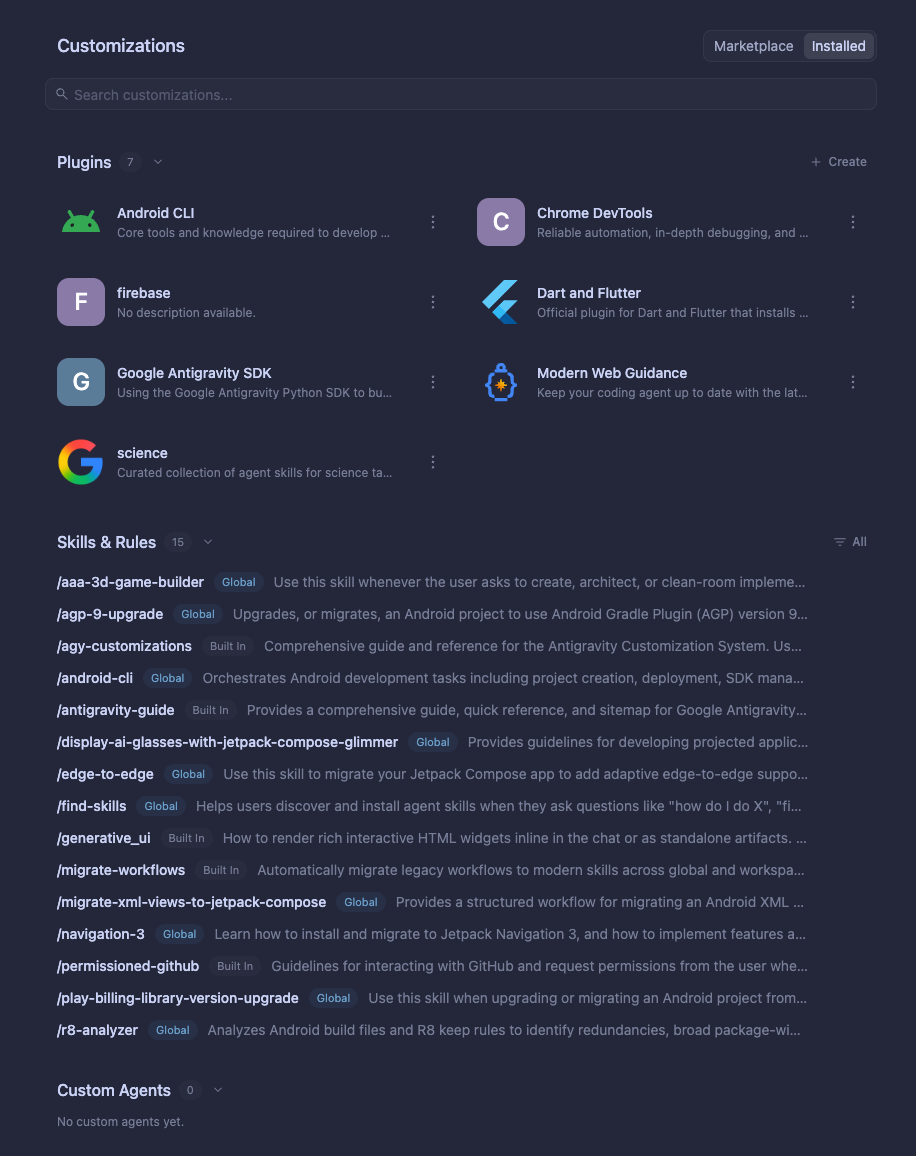
Use the top segmented toggle to switch between Marketplace (all available plugins) and Installed (your installed plugins, skills, rules, and custom agents):
-
In the Marketplace tab, click + on a plugin card to install it, or click the card to inspect its starter prompts, Overview, Skills, MCP, Agents, and Rules tabs before clicking Add.
-
In the Installed tab, click the ⋮ menu beside any plugin (or open the plugin card) to enable, disable, or uninstall it.
For a complete step-by-step walkthrough with screenshots, refer to the Marketplace guide.
Manual plugin installation
Section titled “Manual plugin installation”You can also install custom or local plugins by placing their directories in either of the following locations:
- Workspace level: Place your plugin folder in
.agents/plugins/at the root of your workspace. The plugin activates only when working in that project. - Global level: Place your plugin folder in
~/.gemini/config/plugins/. The plugin activates across all workspaces on your workstation.
Antigravity CLI
Section titled “Antigravity CLI”Interactive plugins manager (/plugin)
Section titled “Interactive plugins manager (/plugin)”In an interactive TUI session, run /plugin (or its alias /plugins) to open
the Plugins Manager, where you can browse the marketplace in the
Discover tab, install plugins from a local directory, or enable, disable,
and uninstall plugins in the Installed tab.
You can also manage and install plugins directly from the prompt using inline
subcommands (install, uninstall, enable, disable, and list). For
marketplace installs, <marketplace-name> supports the official marketplace
(antigravity-plugins-official):
/plugin install <plugin-name>@antigravity-plugins-official
/plugin install <local-path>
/plugin enable <plugin-name>
/plugin disable <plugin-name>
/plugin uninstall <plugin-name>
/plugin list
For the full interactive walkthrough of the Discover and Installed tabs, keyboard shortcuts, and inline marketplace commands, refer to the Marketplace guide.
CLI shell subcommands (agy plugin)
Section titled “CLI shell subcommands (agy plugin)”Outside an interactive TUI session, the Antigravity CLI exposes the agy plugin
subcommand pipeline to install, inspect, validate, and manage plugins from your
shell:
- Install a plugin: Install from the official marketplace
(
antigravity-plugins-official, requires an activeagysign-in session), a GitHub repository URL, or a local directory:# Install from the official marketplace (<marketplace-name> only supports antigravity-plugins-official) agy plugin install <plugin-name>@antigravity-plugins-official # Or install by plugin name (defaults to <plugin-name>@antigravity-plugins-official) agy plugin install <plugin-name> # Install from a GitHub repository link agy plugin install https://github.com/<owner>/<repo> # Install from a local plugin directory agy plugin install </path/to/local/plugin> - Import extensions from Gemini CLI or Claude Code: Migrate existing
extensions from
~/.gemini/extensions/or~/.claude/plugins/(or pass a specific directory path):agy plugin import agy plugin import gemini agy plugin import claude - List installed plugins: View all installed plugins, their enabled or
disabled state, version, source, and component counts. Pass
--jsonto output the list as a JSON array with full component names (skills,agents,rules,mcpServers, andhooks) and installation paths:
Running# Human-readable summary of installed plugins agy plugin list # Machine-readable JSON output with component names and paths agy plugin list --jsonagy plugin listoutputs a summary of installed plugins and component counts:
RunningInstalled plugins: - firebase (enabled, 1.0.3) Source: antigravity-plugins-official Components: 13 skills, 1 agent - flutter (enabled, 1.0.6) Source: antigravity-plugins-official Components: 25 skills, 1 agent, 2 rules, 1 MCP server - gcalendar (enabled, 0.0.7) Source: antigravity-plugins-official Components: 1 skillagy plugin list --jsonoutputs the full details in JSON format:[ { "name": "firebase", "enabled": true, "version": "1.0.3", "source": "antigravity-plugins-official", "path": "/home/user/.gemini/config/plugins/firebase", "skills": [ "firebase-ai-logic", "firebase-app-hosting", "firebase-auth-basics", "firebase-basics" ], "agents": [ "firebase" ] }, { "name": "gcalendar", "enabled": true, "version": "0.0.7", "source": "antigravity-plugins-official", "path": "/home/user/.gemini/config/plugins/gcalendar", "skills": [ "gcalendar" ] } ] - Enable or disable a plugin: Toggle a plugin without removing its files:
agy plugin disable <plugin_name> agy plugin enable <plugin_name> - Uninstall a plugin: Remove the plugin files and clean up configuration
registries:
agy plugin uninstall <plugin_name> - Validate a plugin directory: Validate
plugin.json, component frontmatter, MCP server and hook configurations, and logo paths (--stricttreats warnings as errors):agy plugin validate ./my-plugin agy plugin validate --strict ./my-plugin
CLI filesystem location
Section titled “CLI filesystem location”When installed, the CLI stages plugin assets in your global configuration directory:
~/.gemini/config/plugins/<plugin_name>/Antigravity IDE
Section titled “Antigravity IDE”Standalone IDE plugin installation
Section titled “Standalone IDE plugin installation”In the standalone Antigravity IDE, plugins can be loaded locally or globally:
- Workspace level: Save plugin folders to
.agents/plugins/in your project root. - Global level: Save plugin folders to
~/.gemini/config/plugins/to activate them across all IDE windows. - Editor settings: Access the Customizations dropdown from the agent side panel to review active plugin components and inspect loaded skills.
Build and publish your own plugin
Section titled “Build and publish your own plugin”A plugin is a self-contained directory defined by a plugin.json manifest (or
.antigravity-plugin/plugin.json) alongside optional skills, MCP server
configurations, custom agents, rules, and lifecycle hooks:
{
  "$schema": "https://antigravity.google/schemas/v1/plugin.json",
  "name": "my-first-plugin",
  "displayName": "My First Plugin",
  "version": "1.0.0",
  "description": "Starter plugin that bundles custom skills and MCP tools.",
  "logo": "assets/logo.svg",
  "suggestedPrompts": [
    "Run a readiness check on the current project"
  ]
}
Ready to create a custom plugin for your team or publish a partner integration to the Antigravity Marketplace? Continue to Build plugins for: