

Available on:
Antigravity CLI
Model quotas (/usage)
Section titled “Model quotas (/usage)”View your active model quota usage and refresh your configuration.
Overview
Section titled “Overview”Antigravity CLI provides the /usage command (alias /quota) to help you monitor your resource consumption. When run, the command refreshes your model configuration and quota status from the backend and opens an interactive TUI panel.
Viewing your usage
Section titled “Viewing your usage”To open the Model Quotas panel, follow these steps:
- Type
/usage(or/quota) in the prompt box. - Press Enter.
/usage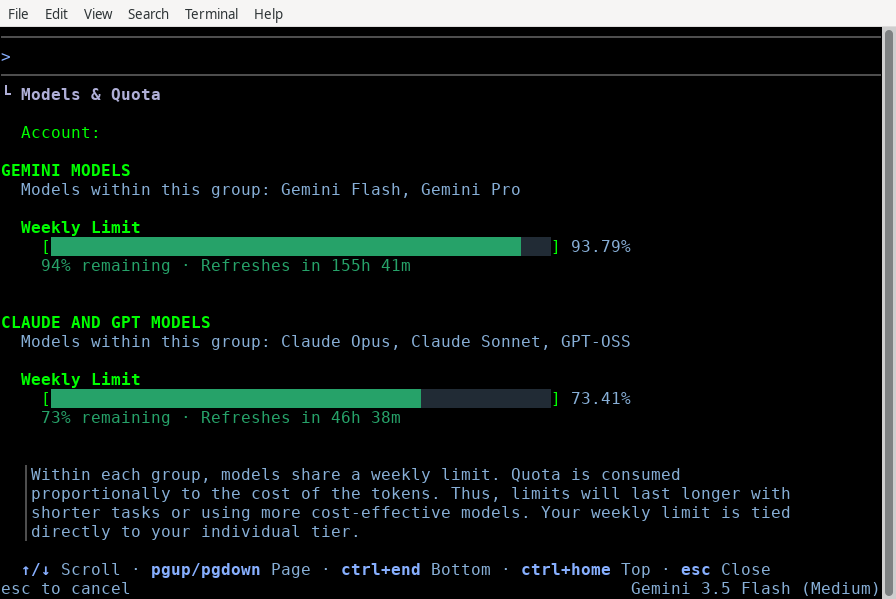
Interactive panel features
Section titled “Interactive panel features”The panel displays the following details:
- Model quotas: A breakdown of your usage limits and remaining requests/tokens for each supported model (such as Gemini 3.5 Flash and Gemini 3.1 Pro).
- Active refresh: The CLI automatically triggers a fresh check of your quotas on disk and from the backend service when you open this panel.
Navigation controls
Section titled “Navigation controls”Use the following keyboard shortcuts to navigate the panel:
| Key | Action |
|---|---|
| ↑ / ↓ (or J / K) | Scroll up or down by one line. |
| PgUp / PgDn | Scroll up or down by one page. |
| G / Shift + G | Jump to the top or bottom of the list. |
| Esc (or Q) | Close the panel and return to the prompt. |
Next steps
Section titled “Next steps”Explore the following guides to learn more about CLI commands and settings:
- CLI reference: View all available slash commands and keybindings.
- Settings, rendering, and keybindings: Configure your default models and credit usage preferences.