newspaperPress Guidelines
Pricing
Blog
Downloaddownload

Explore our next generation products

See overview

Products

antigravityAntigravity 2.0terminalAntigravity CLIcodeAntigravity IDEsdkAntigravity SDK

Built for developers in the agent-first era

See overview
EnterpriseFrontendFullstackScienceMarketer

Everything you need to stay up-to-date and get help

Documentationkeyboard_arrow_rightChangelogSupportPressReleases

Explore our next generation products

See overview

Products

antigravityAntigravity 2.0terminalAntigravity CLIcodeAntigravity IDEsdkAntigravity SDK

Built for developers in the agent-first era

See overview
EnterpriseFrontendFullstackScienceMarketer
Pricing
Blog

Everything you need to stay up-to-date and get help

Documentationkeyboard_arrow_rightChangelogSupportPressReleases
Home
Antigravity 2.0v2.3.1keyboard_arrow_right
Overview
Getting Started
Build with Google
Feature Overview
Models
Projects
Settingskeyboard_arrow_right
Overview
Agent Settings
Artifact Review
Customizationskeyboard_arrow_right
MCP
Skills
Rules
Plugins
Hooks
Sidecars
Agent Capabilitieskeyboard_arrow_right
Permissions
Subagents
Artifactskeyboard_arrow_right
Overview
Plan
Walkthrough
Screenshots
Antigravity CLIv1.1.3keyboard_arrow_right
Overview
Getting Started
Installation & Auth
Tutorial
Using AGY CLI
Features
Gemini Migration
Prompting
Artifactskeyboard_arrow_right
Overview
Conversations
Agent Capabilitieskeyboard_arrow_right
Choose an execution mode
Subagents
Sandbox
Permissions
Projects
Settingskeyboard_arrow_right
Overview
AI Credits
Customizationskeyboard_arrow_right
MCP
Plugins & Skills
Status Line
Window Title
Commandskeyboard_arrow_right
Agents (/agents)
Code Search (/codesearch)
AI Credits (/credits)
Diff (/diff)
Permissions (/permissions)
Resume (/resume)
Status Line (/statusline)
Window Title (/title)
Model Quotas (/usage, /quota)
Best Practices
Troubleshooting
Reference
Antigravity SDKv0.1.7keyboard_arrow_right
Overview + Quick Start
Customizationskeyboard_arrow_right
MCP
Antigravity IDEv2.1.1keyboard_arrow_right
Overview
Getting Started
Featureskeyboard_arrow_right
Tab
Side Panel
Review Changes
Artifactskeyboard_arrow_right
Plan
Walkthrough
Screenshots
Browser Recordings
Browserkeyboard_arrow_right
Overview
Allowlist / Denylist
Separate Chrome Profile
Customizationskeyboard_arrow_right
MCP
Skills
Rules
Workflows
Plugins
Hooks
Settings
Migrationkeyboard_arrow_right
Firebase Studio Migration
Enterprise
Plans
FAQ
  • side_navigation
  • Antigravity CLI
  • >
  • Commands
  • >
  • Model Quotas (/usage, /quota)

Model Quotas (/usage)link

View your active model quota usage and refresh your configuration.

Overviewlink

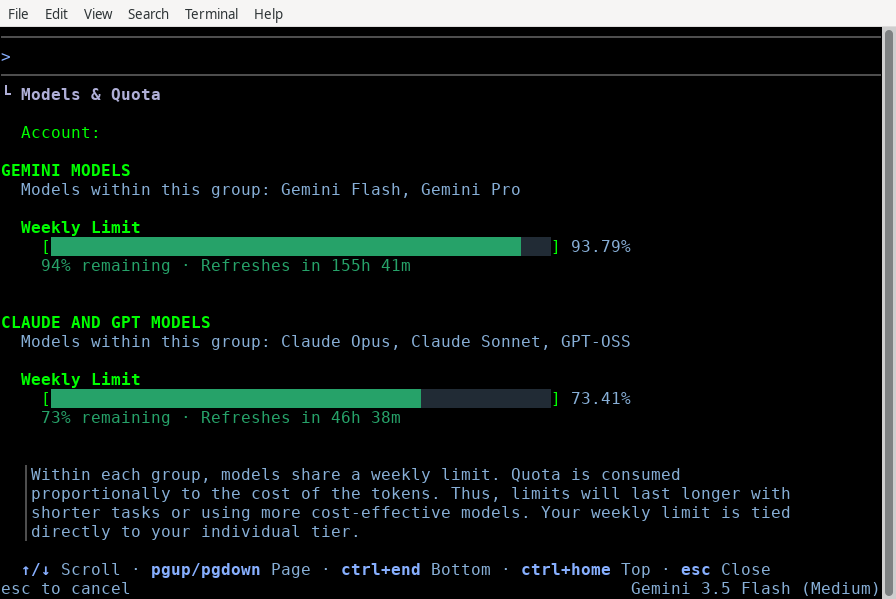
Antigravity CLI provides the /usage command (alias /quota) to help you monitor your resource consumption. When run, the command refreshes your model configuration and quota status from the backend and opens an interactive TUI panel.

Viewing your usagelink

To open the Model Quotas panel:
  1. Type /usage (or /quota) in the prompt box.
  2. Press Enter.
text
/usage
Quota & Credits TUI

Interactive Panel Featureslink

The panel displays:
  • Model Quotas: A breakdown of your usage limits and remaining requests/tokens for each supported model (e.g., Gemini 3.5 Flash, Gemini 3.1 Pro).
  • Active Refresh: The CLI automatically triggers a fresh check of your quotas on disk and from the backend service when you open this panel.

Navigation Controlslink

Use the following keyboard shortcuts to navigate the panel:
KeyAction
↑ / ↓ (or j / k)Scroll up or down by one line.
PgUp / PgDnScroll up or down by one page.
g / GJump to the top or bottom of the list.
Esc (or q)Close the panel and return to the prompt.

Next stepslink

  • CLI Reference: See all available slash commands and keybindings.
  • Settings & Rendering: Configure your default models and credit usage preferences.
Window Title Command (/title)
Best Practices
On this Page
Model Quotas (/usage)OverviewViewing your usageNext steps