Explore our next generation products
Built for developers and teams in the agent-first era
Everything you need to stay up-to-date and get help
Bringing MCP Apps to Antigravity

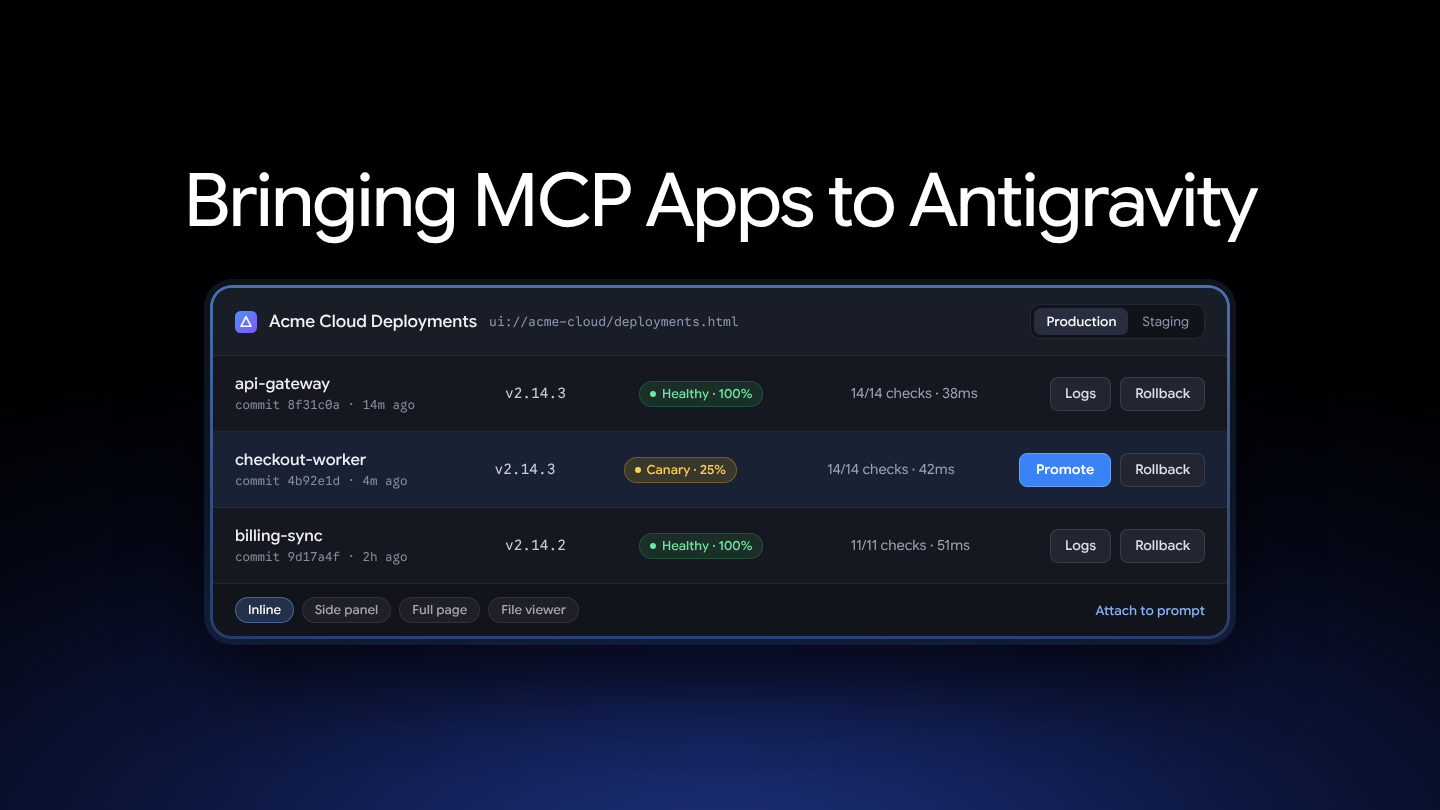
Today, we are adding MCP Apps support to Google Antigravity. When an agent calls a Model Context Protocol (MCP) tool today, the response normally comes back as text or raw JSON. Built on the open MCP Apps extension (SEP-1865) (io.modelcontextprotocol/ui), MCP Apps let any MCP tool render an interactive HTML interface directly inside the workspace alongside its plain-text output, so graph data, time series charts, and other non-standard responses appear in a readable UI tailored to the task. Standard MCP Apps work out of the box without code changes, and optional Antigravity extensions (com.google.antigravity/ui) let tools open in the side panel, as full-page views in the left sidebar, or as custom file viewers and editors.
Why MCP Apps?
MCP Apps provide a consistent surface for tool results from an MCP server to accurately represent what a plugin does for users. Standard MCP tool calls return JSON or Markdown summaries, forcing the agent to find a way to communicate that information. With an MCP App, users get a standard, repeatable UI representing information based on the data returned by the tool call. Whether a tool displays a file viewer, status updates, or other structured output, that information arrives in a consistent UI that users can better understand.
Where MCP Apps show up
Every MCP App comes from a plugin or MCP server installed or built by users, and each tool controls where it appears through its metadata (see the full breakdown in Where MCP Apps appear):
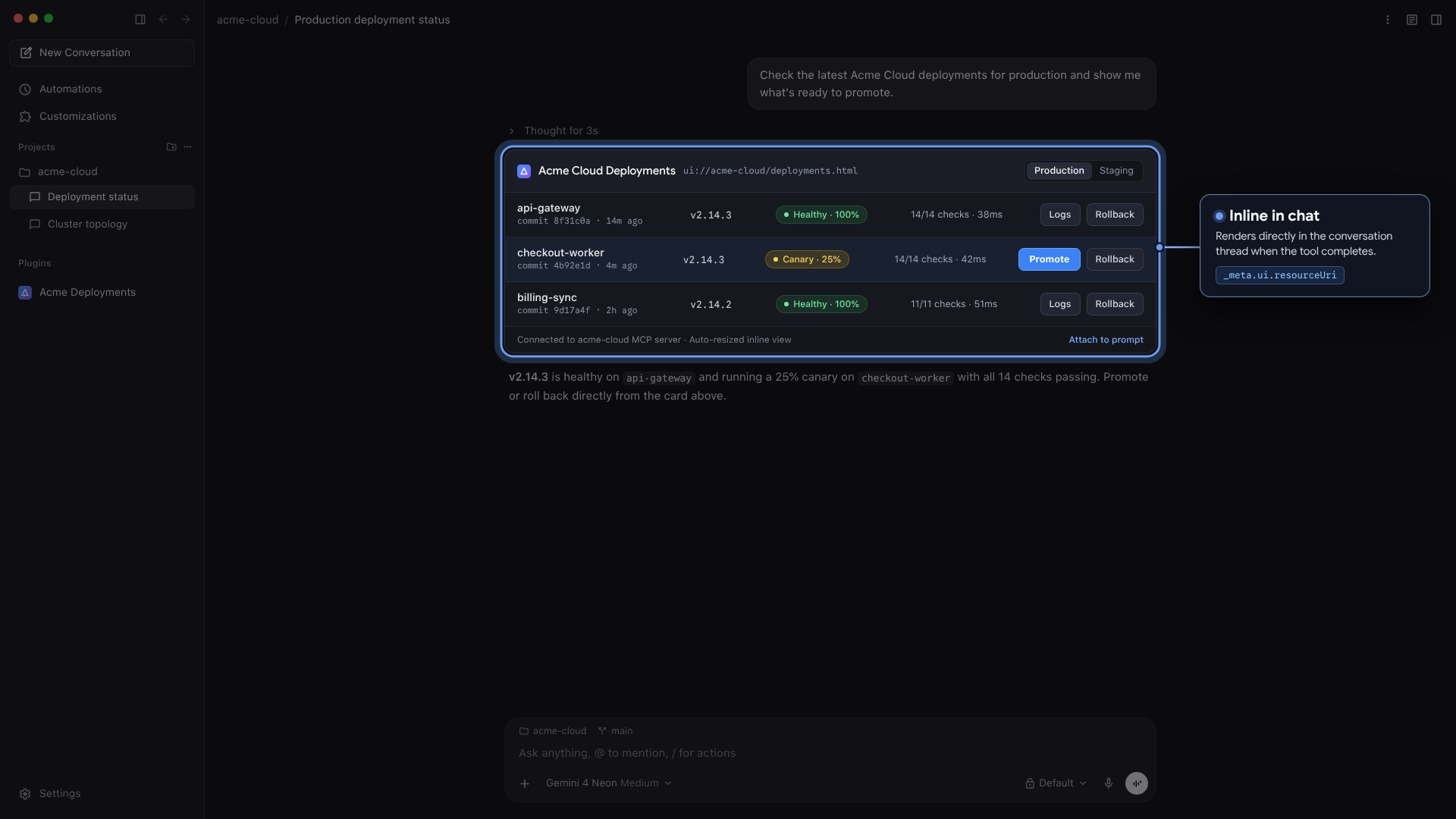
Inline in chat
The default rendering surface. When a tool declares _meta.ui.resourceUri, its view renders directly beneath the completed tool step in chat, replacing the raw JSON wrapper and auto-resizing vertically. Inline views work best for focused previews, metric graphs, checklists, and diagrams that users inspect right in the flow of a conversation.
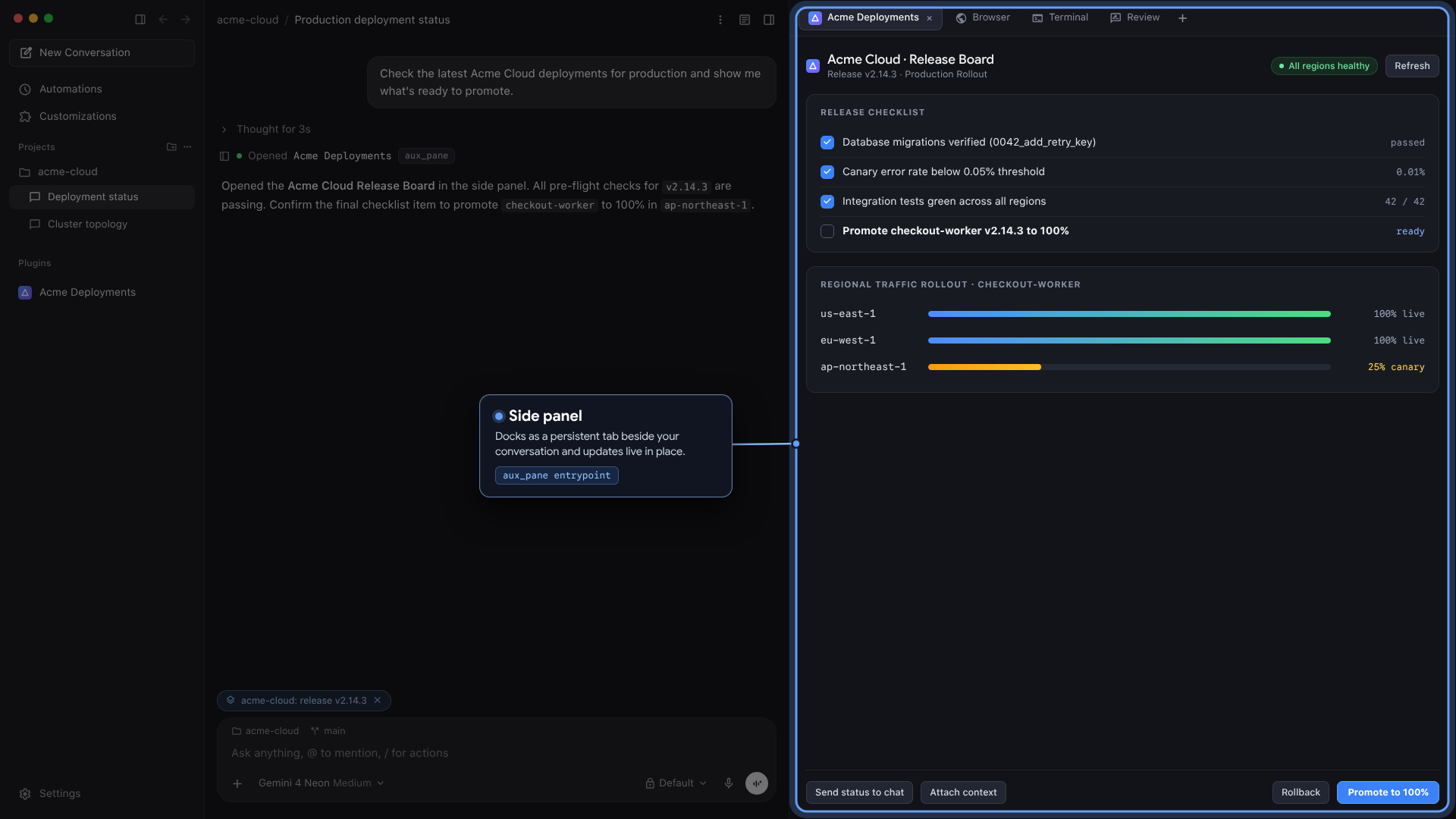
Side panel
With an aux_pane entrypoint under com.google.antigravity/ui, a tool opens as a persistent tab beside the active conversation. It opens automatically when the agent calls the tool, when users click Open in side pane on a completed step, or manually from Overview > Plugins, the side panel + menu, or More actions (⋯) > Plugins. Repeat calls from the agent update the open tab live in place instead of cluttering the thread with duplicate cards, and Antigravity keeps up to 5 hidden tabs mounted in memory as users switch tabs or conversations.
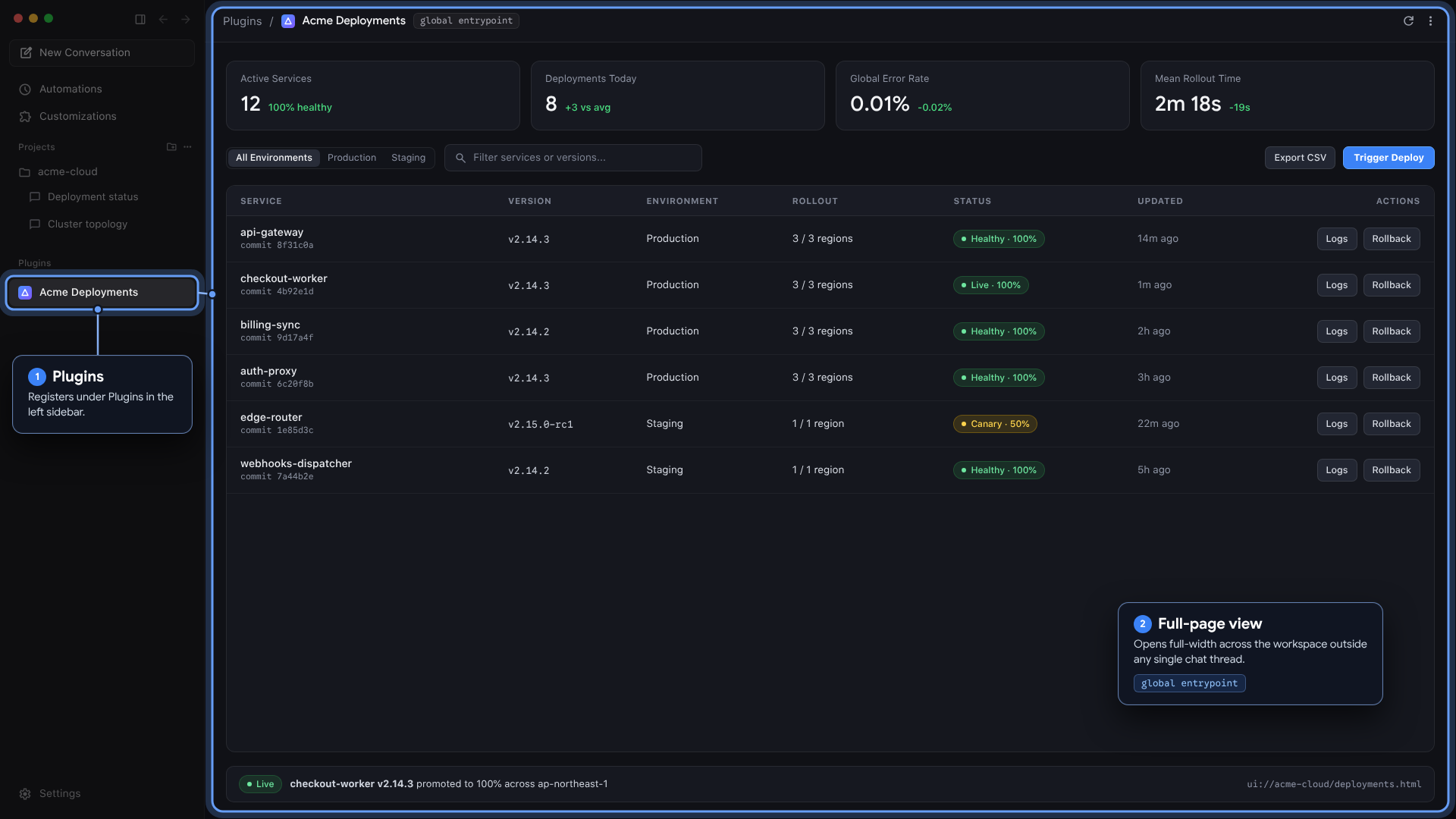
Full page in the sidebar
With a global entrypoint, a tool registers under Plugins in the left sidebar and opens full-width outside any single conversation. This surface fits workspace-wide dashboards, boards, and catalogs that users can browse without tying them to one chat thread.
Custom file viewers and editors
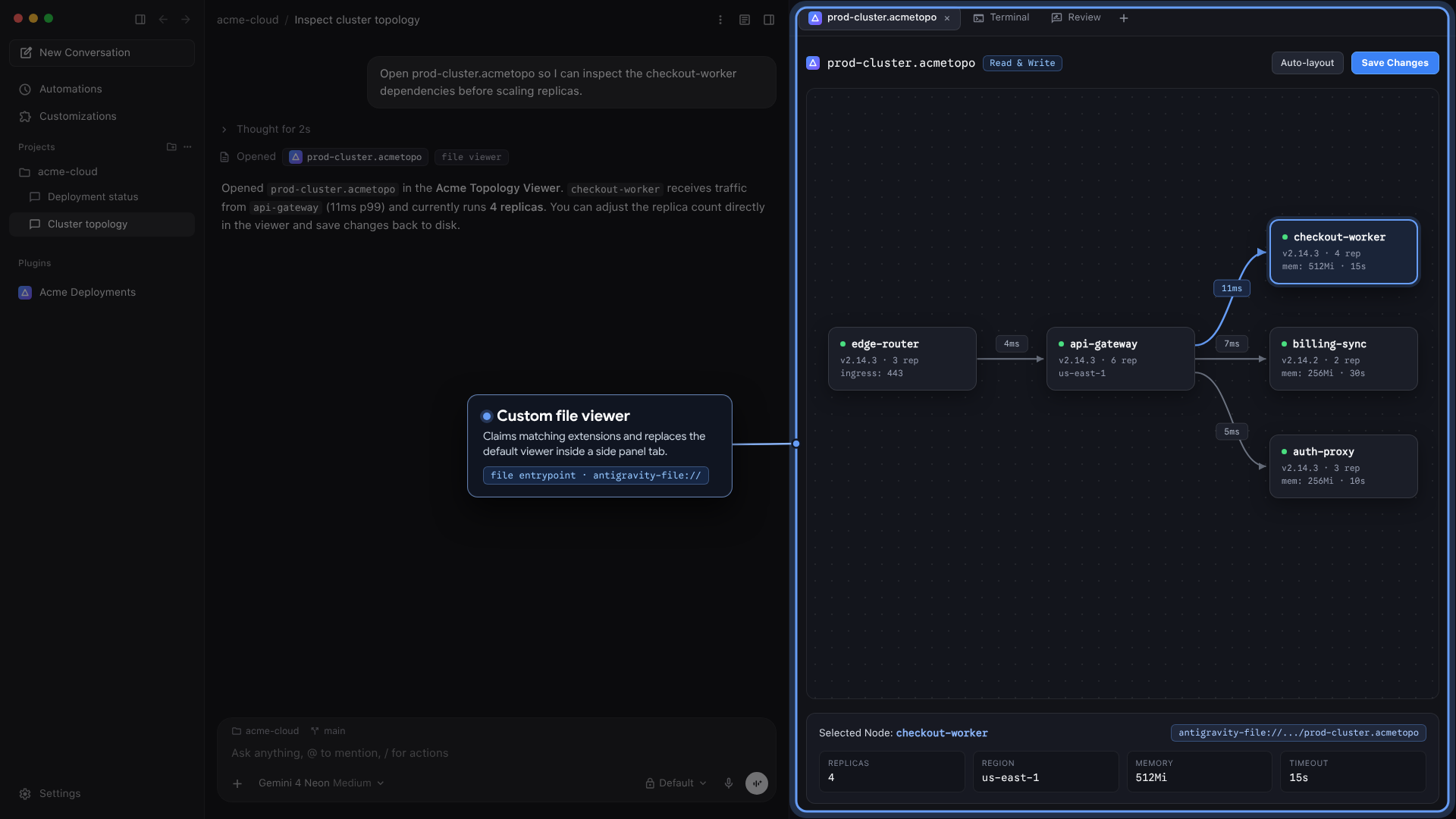
With a file entrypoint, a tool claims specific file extensions (such as .stl 3D meshes, schematics, or custom visual formats) and replaces the built-in viewer when users open matching files in a side panel tab or artifact view. Antigravity passes an opaque per-view antigravity-file:// URI instead of exposing the filesystem path, reads file bytes through the host, and grants local save-back only when editing local files on disk (see Custom file viewers and editors).
See it in action
Vercel MCP App
Watch the Vercel plugin turn a plain-text open_deployments response into an interactive Preview Deployment card inline in chat, attach the preview URL straight into the next prompt, and spin up a live shared Vercel Sandbox Desktop so developers and agents can test the storefront at desktop and mobile widths side by side.
Vercel MCP App in Google Antigravity: preview deployment status card inline in chat and a live shared Vercel Sandbox Desktop for testing desktop and mobile widths.
All four surfaces walkthrough
Below is a walkthrough of an Acme Cloud Deployments MCP App running across all four surfaces in the Google Antigravity platform: inspecting an inline deployment card in chat, opening the release board in the side panel to promote a canary rollout and attach context to the composer, switching to the full-page dashboard from Plugins in the left sidebar, and editing a custom .acmetopo file inside a custom file viewer tab.
MCP Apps in the Antigravity App: inspect an inline deployment card in chat, open the side panel release board to promote a canary rollout, switch to the full-page view from Plugins in the sidebar, and edit a custom file type in a file viewer tab.
Plugins that already have MCP Apps
 Observability
Better Stack
“With MCP Apps in Antigravity, Better Stack shows your logs and metrics as charts right in the chat. You ask why checkout got slow and see the latency spike next to the answer, without leaving your editor.”
Šimon Let, Product Engineer, Better Stack
 Developer Tools
CodeRabbit
“With CodeRabbit in Antigravity, you can review and secure your code right where you write it. MCP gives your agent that same review workflow. If you can do it with CodeRabbit, now your agent can too.”
Nehal Gajraj, Research Engineer, CodeRabbit
 Observability
Datadog
“After shipping a change, a developer can ask Antigravity why checkout latency spiked and get a live Datadog graph inline instead of a text paragraph describing one. They can see the regression, ask a follow-up to narrow it to one service, and view updates in the same place they’re working.”
Vanessa Siriwalothakul, Senior Software Engineer, Datadog
 Productivity & Project Management
monday.com
“The future of AI-powered development isn’t just about writing code faster; it’s about building the right things together. With monday.com in Google Antigravity, users connect to their priorities while bringing development progress back into view, keeping technical and business stakeholders aligned and collaborating.”
Eviathar Moussaffi, Director of R&D at monday.com
 Developer Tools
Qodo
“Google Antigravity’s support for MCP Apps gives Qodo a way to bring interactive code review into the coding agent’s workflow. We’re using the open standard to let developers go from a summary of an agent’s work to the code and review findings behind it, all in the same conversation.”
Tomer Damti, Partnerships Engineering Lead, Qodo
 Cloud Hosting & Deployment
Vercel
“We’re excited to see Antigravity support MCP Apps. Developers can spin up a Vercel Sandbox and control a live desktop right in the editor, then follow their deployment with live status and build logs on a Vercel deployment card, all without leaving Antigravity.”
Josh Souphanthong, Software Engineer, Vercel
Get started
To get started with MCP Apps from the Plugin Marketplace, open Customizations > Marketplace in Antigravity, install any of the plugins above, and sign in when prompted.
Looking to build a custom plugin? Antigravity includes a built-in /mcp-app-development skill that scaffolds a complete plugin with a single-file HTML frontend, MCP server, and mcp_config.json. Run this prompt to start:
/mcp-app-development Build an MCP App plugin for Antigravity that tracks release checklist items inline in chat and in a side panel board using @modelcontextprotocol/ext-apps.For entrypoint schemas, custom file viewer APIs, host limits, and upstream protocol references, see the MCP Apps documentation, the Build plugins guide, and the upstream SEP-1865 specification.